
Move your captions to another format.
Convert uploaded SRT or WebVTT captions to a compatible SRT, WebVTT or ASS output within a video task.
Free account · Local uploads · Background processingConvert subtitles. From source to download.
- 01
Upload your source
Sign in and upload a local file. Inspection checks the streams and duration.
- 02
Adjust the operation
The relevant settings section opens after inspection. Review the starting values below.
- 03
Preview and review
Render a short processed preview where applicable, then save and review the full task.
- 04
Convert and download
Follow background processing and download the validated output.
Convert subtitles settings
Choose the operation here and it stays selected through registration or sign-in. Upload and inspect your source to open its settings. Starting values are editable; check them against your file before submitting.
Video source
Upload and inspect a video to open this workspace.
Subtitle upload
UTF-8 SRT or WebVTT, up to 2 MiB.
Output format
Choose SRT, WebVTT or ASS.
What to check before exporting
This currently requires a video task; it is not a standalone subtitle-only upload tool. Explicit conversion simplifies styling to plain text. It does not perform OCR on image-based captions.
Choose a compatible output profile and review the source streams, selected range and final settings. Processing uses structured controls, and incompatible combinations are rejected before queueing. Download the requested result when final validation completes.
A real workspace. A result you can inspect.
This actual product screenshot shows source playback, range selection, an uploaded-audio area and encoding settings. It illustrates the shared converter; your operation opens its own relevant controls after inspection.
A processed preview creates a separate short task. It covers the first ten seconds of your range at up to 360p in a compatible format. Image and subtitle exports still need inspection of the requested final download.
Explore the Media Converter overview →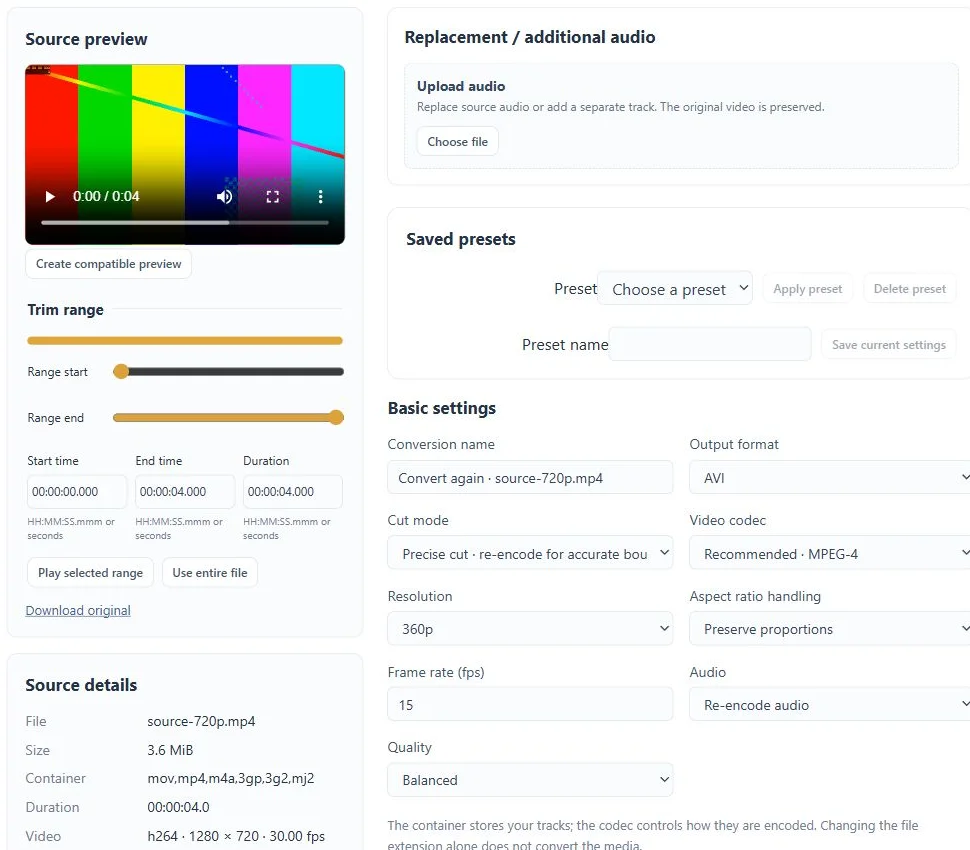
Questions about this workflow
Will complex styling be preserved?
No complete styling preservation is promised. Check the exported text and timing, especially when moving between formats with different features.
Can I close the tab while processing?
Yes. Submitted conversion tasks run in the background. Return to your account to check progress and download results before the retention period ends.
What are the upload and storage limits?
Current source limits are 2 GiB and two hours per file. Files have a 72-hour retention period; task, collection and resource limits also apply. The workspace shows the applicable limits. Free and Pro currently share feature access.