Record in your browser
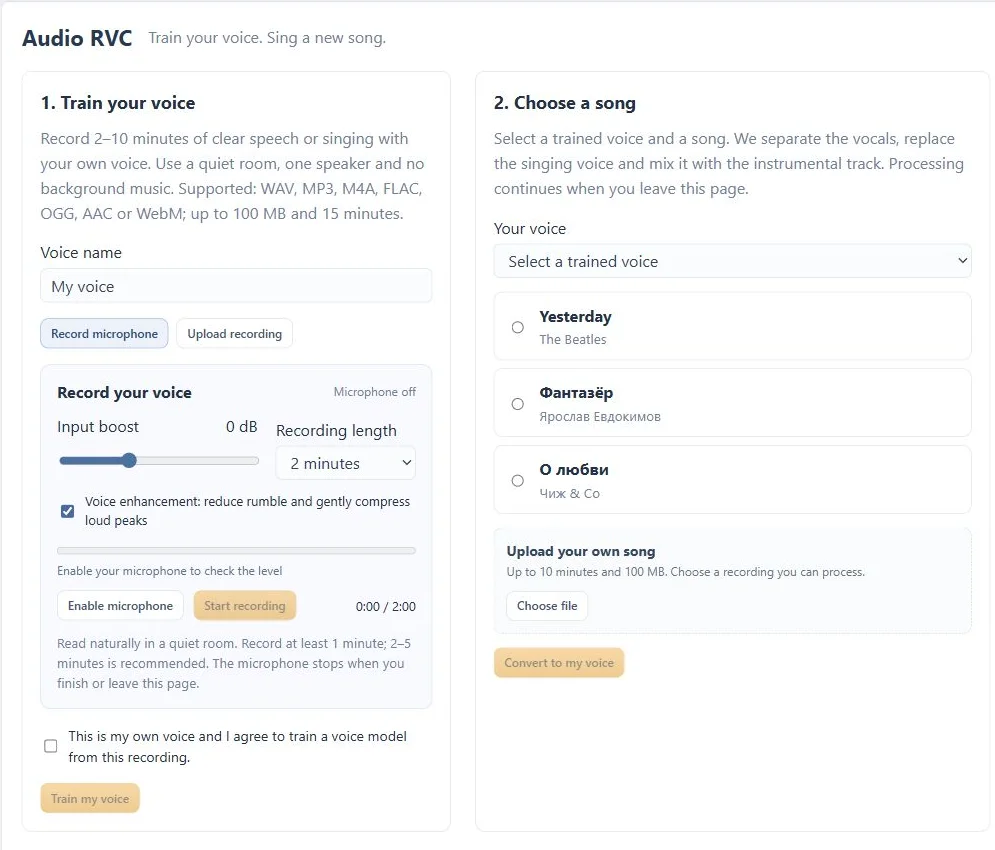
Use the microphone recorder with input boost and voice enhancement controls, or upload a recording you already have.
 Cyber Search MatchFace indexing and visual search.
Record a sample of your own voice, create a voice model and use it for song conversion or a playful push-to-talk exchange.
Try Voice ChangerAvailable in your workspace · Free account required
A focused tool, connected to the rest of your media workflow.
Use the microphone recorder with input boost and voice enhancement controls, or upload a recording you already have.
Train from a clear sample of your own voice and choose the resulting model for a conversion.
Press, speak, release and hear the converted response after processing. This is turn-based voice changing, not a zero-latency live effect.
Know what you are getting before you start.
The training flow is for your own voice and asks you to confirm that you consent to creating the model.
The recorded phrase is sent for server processing after you release the button. Playback follows when the converted audio is ready.
No. The voice recorder lets you record directly from your microphone with adjustable input boost.
Choose a trained voice and a song, then listen to the converted mix, vocal and instrumental separately.
Explore ai song covers →02 / CreateConvert video and audio, trim a range, extract sound and combine processing steps in a guided workspace.
Explore media converter →03 / CreateChange format, resolution and frame rate with compatible codecs and a clear review step before processing.
Explore video converter →No card required. Start with a Free account.