Go beyond an extension
Choose MP4, MKV, MOV, WebM, AVI and other available profiles with compatible audio and video codecs.
 Cyber Search MatchFace indexing and visual search.
Change format, resolution and frame rate with compatible codecs and a clear review step before processing.
Try Video ConverterAvailable in your workspace · Free account required
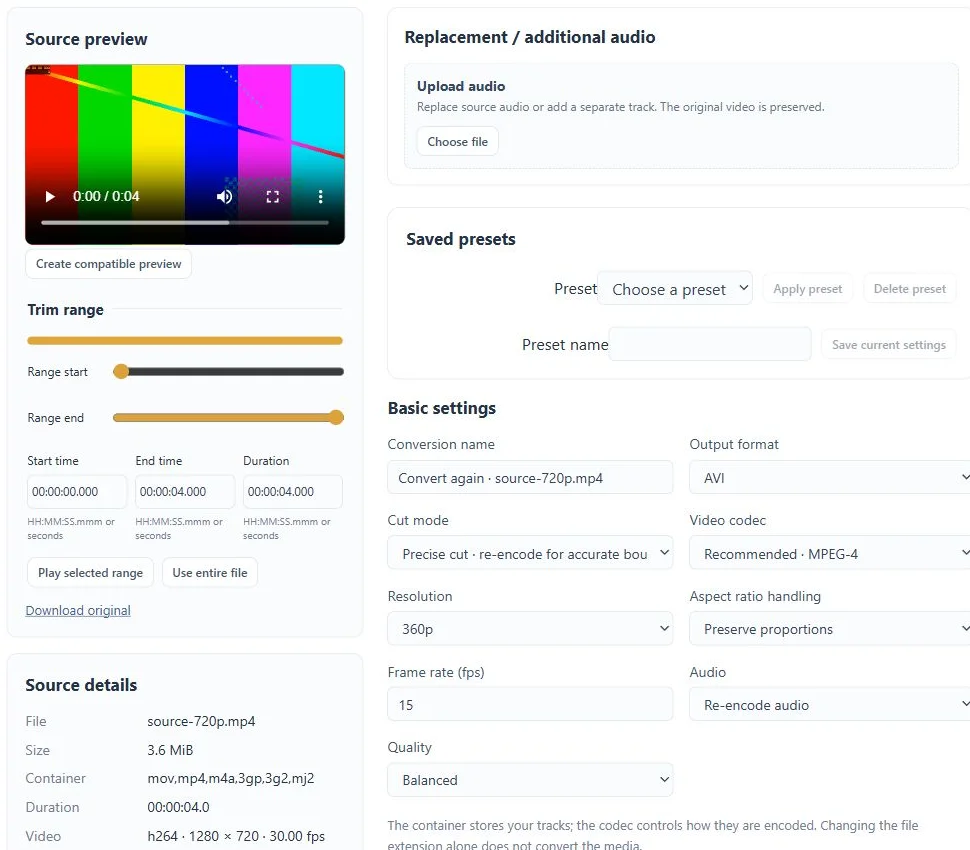
A focused tool, connected to the rest of your media workflow.
Choose MP4, MKV, MOV, WebM, AVI and other available profiles with compatible audio and video codecs.
Adjust resolution, frame rate, quality, bitrate and encoding speed. A target size estimates the bitrate; the final size can vary.
Select an exact range, resize, crop, add fields or apply supported filters as part of the conversion.
Know what you are getting before you start.
Yes. Choose AVI, 360p and 15 fps; the workspace proposes compatible video and audio codecs.
Upscaling changes dimensions but does not restore detail that was never captured.
Some professional formats do not play natively. Download the requested file or create a compatible preview.
Record a sample of your own voice, create a voice model and use it for song conversion or a playful push-to-talk exchange.
Explore voice changer →02 / CreateChoose a trained voice and a song, then listen to the converted mix, vocal and instrumental separately.
Explore ai song covers →03 / CreateConvert video and audio, trim a range, extract sound and combine processing steps in a guided workspace.
Explore media converter →No card required. Start with a Free account.