
Join the recordings. Keep their order.
Join audio files end to end into one recording. Choose the order, select an audio output and use compatible stream copy or re-encoding.
Free account · Local uploads · Background processingMerge audio. From source to download.
- 01
Choose the sources
Upload local files or reuse inspected uploads from your account.
- 02
Set the workflow
Merge audio is selected. Review the source order, output profile and task settings.
- 03
Review and submit
Check that the chosen settings fit each source, then queue the group.
- 04
Download the results
Return to each task for its status and available downloads.
Merge audio settings
Choose the operation here and it stays selected through registration or sign-in. Upload and inspect your source to open its settings. Starting values are editable; check them against your file before submitting.
Workflow
Merge files opens with an MP3 output profile.
Source order
Place the recordings in playback order.
Output format
Choose a compatible audio profile and review encoding settings.
What to check before exporting
Merge is sequential concatenation. It does not overlay background music, automatically remove silence at joins or crossfade the recordings. Mix Audio is the separate operation for sounds that should play at the same time.
Choose a compatible output profile and review the source streams, selected range and final settings. Processing uses structured controls, and incompatible combinations are rejected before queueing. Download the requested result when final validation completes.
A real workspace. A result you can inspect.
This actual product screenshot shows source playback, range selection, an uploaded-audio area and encoding settings. It illustrates the shared converter; your operation opens its own relevant controls after inspection.
A processed preview creates a separate short task. It covers the first ten seconds of your range at up to 360p in a compatible format. Image and subtitle exports still need inspection of the requested final download.
Explore the Media Converter overview →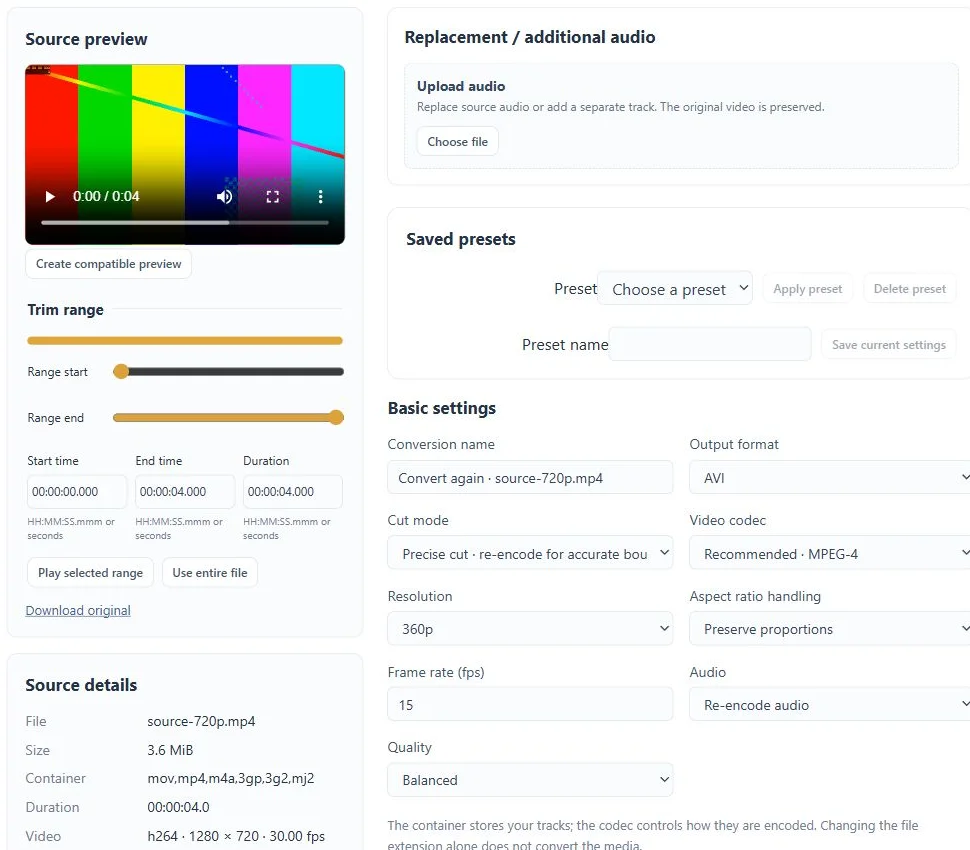
Questions about this workflow
Can I join files with different sample rates?
Re-encoding can bring supported sources to a common audio configuration. Copy mode requires compatible stream parameters and will reject incompatible combinations.
Can I close the tab while processing?
Yes. Submitted conversion tasks run in the background. Return to your account to check progress and download results before the retention period ends.
What are the upload and storage limits?
Current source limits are 2 GiB and two hours per file. Files have a 72-hour retention period; task, collection and resource limits also apply. The workspace shows the applicable limits. Free and Pro currently share feature access.
Keep working with your media.
Mix audio
Mix selected source audio and up to four uploaded audio files into a single output soundtrack.
Split audio
Split audio by duration, explicit boundaries or existing chapters and download each part as an individual file.
Normalize audio
Normalize perceived audio loudness to a LUFS target with a true-peak limit and loudness-range setting. Review the two-pass processing stages and download the result.