
How a face is compared with a reference
Follow our exact comparison request: reference selection, two inference passes, cosine similarity, the 0.45–0.72 display scale and report decisions.
Implementation checked · Cyber Search MatchCompare faces checks each face in Photo 1 against one selected reference; Multi compare faces checks every source face against every reference face. Both use the same cosine calculation, clipped display percentage and technical labels. Neither performs an identity lookup or forces one winning person.
Choose the person before calculating a result
Upload Photo 1 with the people to compare and Photo 2 as the reference. On the first comparison attempt, the interface detects the reference faces without recognition vectors. One detected face can be selected automatically. If several are present, the interface asks you to choose one and press Compare faces again.
The selected face number is sent with the comparison request. It identifies a detection in that reference image, not a permanent person. Changing the reference photo clears the previous selection. A valid reference choice is essential: a correct numerical calculation against the wrong person still answers the wrong question.
The comparison endpoint validates the selection and checks that both photos contain detections. A reference with no valid representation is rejected with a request for a clearer photo. The application does not silently substitute the largest or first detected reference person when the selected person is unavailable.
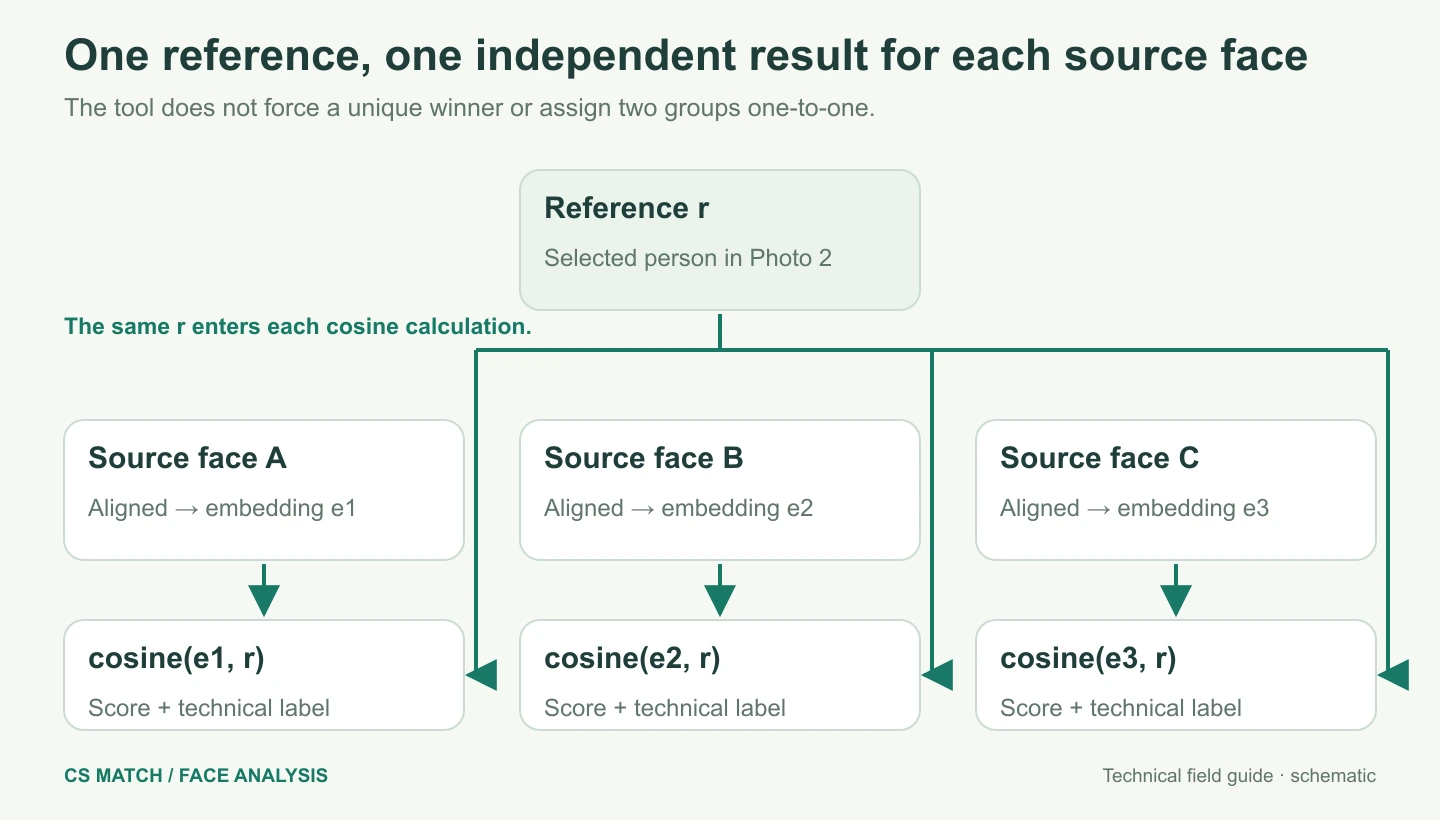
Both photos pass through the same representation pipeline
For the actual comparison, the server prepares Photo 1 and requests embeddings for all of its detected faces. It then prepares Photo 2 and requests embeddings for its detected faces. These inference requests run sequentially, so one comparison does not occupy two worker slots at once. The reference preflight in the browser does not replace this actual recognition pass.
Each face is landmark-aligned and passed through the same recognition network. The selected reference contributes one normalized vector r. For each source detection i, its vector eᵢ is compared against r. With N source detections and D coordinates, the comparison arithmetic is approximately N × D after inference. In our checked checkpoint, D is 512.
The Compare faces mode is a one-reference comparison. Several source faces may score highly, including repeated portraits of one person. It reports each pair independently rather than choosing one winner or proving which people are present. Multi compare faces extends the same calculation to every reference vector.
Reference: r = embedding(selected face in Photo 2)For each source face i: cᵢ = cosine(eᵢ, r)N source faces → N comparison results, not an N × M assignment.Multi compare: every source against every reference
Choose Multi compare faces to include all detections in Photo 2. The reference photo must contain at least two faces; a single-face reference is rejected with a suggestion to use Compare faces. There is no reference-person radio selection in this mode.
The server processes each photo once with embeddings enabled and reuses those representations. For N source faces, M reference faces and D coordinates, the pair arithmetic is approximately N × M × D after inference. Each result carries both its source face number and reference face number. Missing vectors produce unavailable pairs rather than zero scores or omitted detections.
The default Compared report groups pairs by source face and shows the specific reference beside each face. Pages contain up to 24 pairs; the summary counts all pairs. This is independent pair comparison, not a one-to-one assignment: repeated portraits and several strong scores are allowed.
For each source i and reference j: cᵢⱼ = cosine(eᵢ, rⱼ)N source faces × M reference faces → N × M pair resultsThe raw score is a geometric comparison
The comparison function computes the dot product of the two vectors and divides by the product of their lengths. It clamps the result between −1 and 1. Equal dimensions and finite, non-zero vectors are required. If those conditions fail for a source detection, its comparison has no cosine or percentage and is labelled unavailable.
The raw value is shown as Vector similarity. It can be negative without indicating a broken calculation. A value near zero means the learned directions are close to perpendicular; a larger positive value means they are closer in this embedding space. Neither statement alone supplies a verified identity conclusion.
Detection confidence is separate. A detector may be very confident that a patch contains a face while the face’s representation has low similarity to the chosen reference. A low reference comparison therefore does not contradict a high detection-confidence value.
c = Σ(eⱼ × rⱼ) / (sqrt(Σeⱼ²) × sqrt(Σrⱼ²))Valid c is clamped to [−1, 1].How the raw value becomes a percentage
The inspected production configuration uses a low endpoint L = 0.45 and a high endpoint H = 0.72. The internal normalized score is (c − L) / (H − L), clipped to the interval from 0 to 1. The interface displays that value multiplied by 100 and rounded to a whole percentage.
These endpoints create a convenient display scale. They are not a measured probability calibration, a universal law of facial identity or the result of a validation study presented on this site. The code calls the helper calibratedSimilarity, but its implemented operation is a clipped linear rescaling. A deployment configuration change can change the endpoints.
For example, cosine 0.63 produces (0.63 − 0.45) / 0.27 = 0.6667, or about 67% in the interface. Every cosine at or above 0.72 reaches 100%. Every cosine at or below 0.45 reaches 0%. The raw Vector similarity remains useful because the percentage hides distinctions at both clipped ends.
s = clamp((c − 0.45) / (0.72 − 0.45), 0, 1)Displayed percentage = round(100 × s)| Illustrative raw cosine | Displayed percentage | Technical label |
|---|---|---|
| −0.03 | 0% | Low |
| 0.45 | 0% | Low |
| 0.50 | 19% | Low |
| 0.585 | 50% | Inconclusive |
| 0.63 | 67% | Inconclusive |
| 0.666 | 80% | Strong |
| 0.72 | 100% | Strong |
| 0.90 | 100% | Strong |
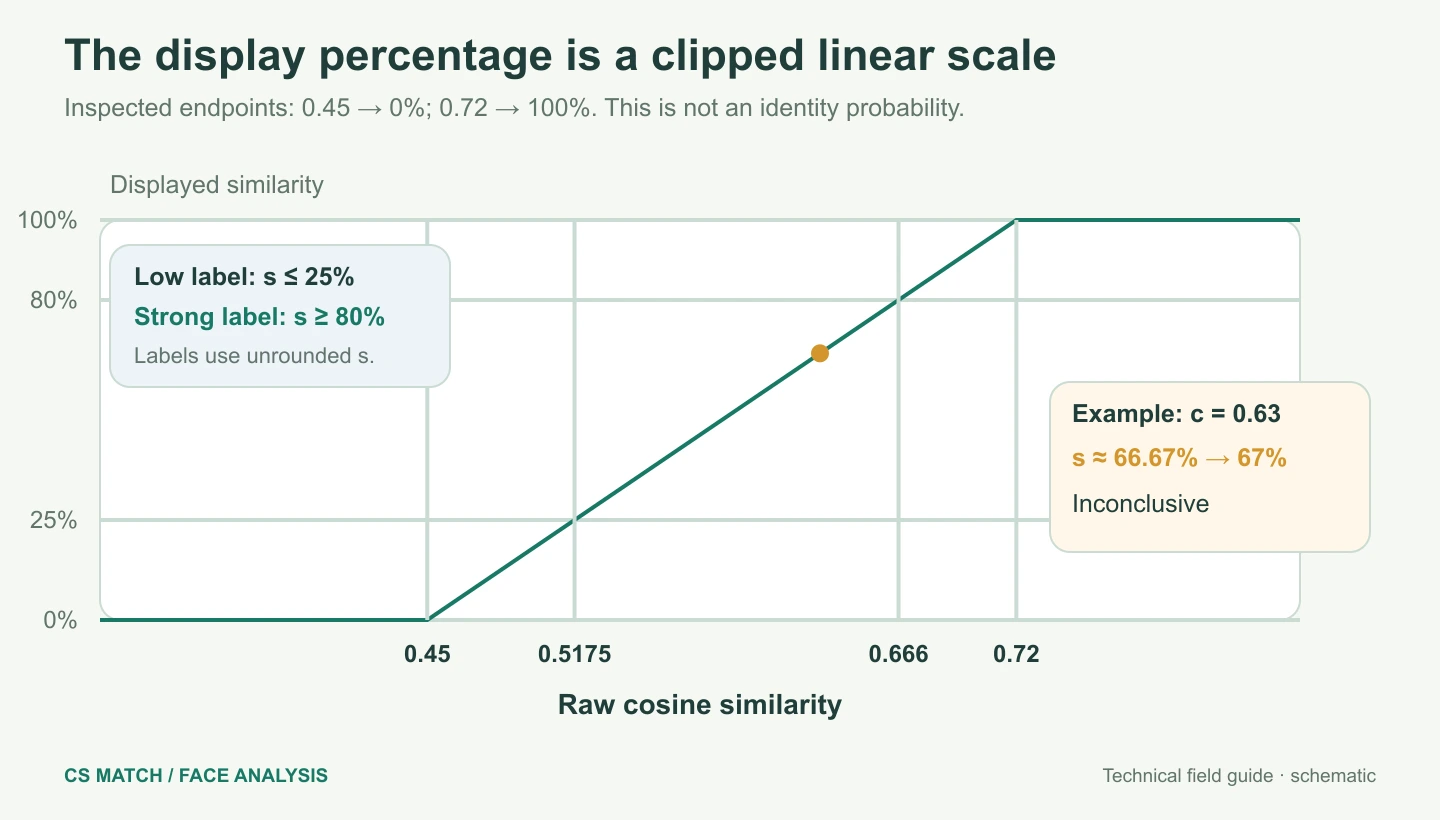
The label uses the unrounded score
The comparison service labels normalized scores of at least 0.8 as strong technical similarity. Scores of at most 0.25 are low technical similarity; values between those boundaries are inconclusive. With the inspected endpoints, those two raw boundaries are 0.666 and 0.5175. They describe this application’s rule, not independently established false-match rates.
The label is assigned before the interface rounds its percentage. A raw cosine of 0.665 yields about 79.63%, which is displayed as 80% while still falling below the unrounded strong boundary. This is why a rounded number near a boundary should be read alongside the label and raw vector value.
Unavailable is a different state from low similarity. A source face that cannot be aligned or represented stays visible, but the application cannot calculate a valid comparison for it. Treat the missing score as missing evidence. Replacing an unavailable value with zero would misleadingly suggest that a valid dissimilarity calculation had occurred.
Two report views, the same comparison data
Cards shows the detected portraits with their confidence, normalized similarity, technical interpretation and raw vector value. Compared places the detected face, percentage and chosen reference crop inside one card, with three cards per row on a wide workspace. Both views use the same completed response; switching the display does not perform another inference or alter the scores.
Use the full-size viewer for either portrait, then inspect the original photos for pose, lighting and context. A summary counts strong, inconclusive, low and unavailable source comparisons. These are counts of detection results, not counts of unique identities. A repeated portrait can occupy multiple rows or cards.
Search this face sends the selected source person crop to Face Search. That separate workflow detects the face again and searches indexed public images. It does not reuse the comparison report as proof of identity. A low comparison to your reference does not prevent you from exploring that source face in the index.
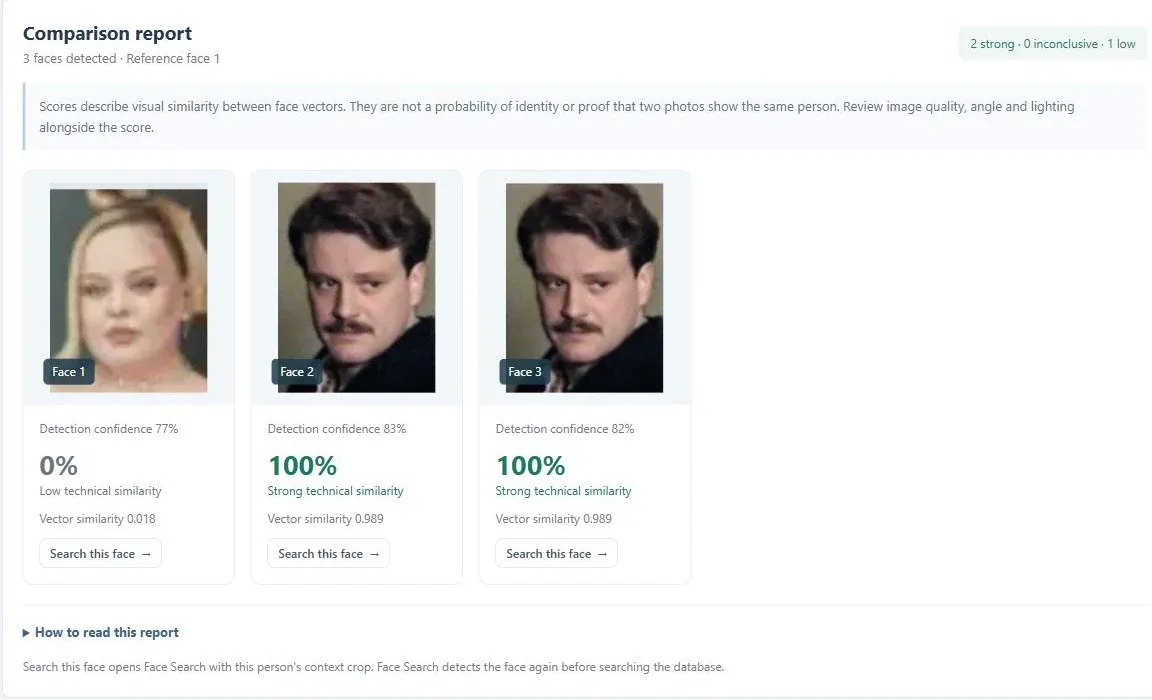
What returns to the browser
The server response contains the source and reference previews, numbered detections, person crops, comparison values, configured endpoints and summary. The public response builder removes each face embedding before returning photo-analysis data. The browser needs images and scores for inspection; it does not need the underlying 512-value vectors.
The Face Analysis route does not insert uploaded photos or vectors into the public index, create a background job history or train a model. The current form and report are retained while moving between workspace sections in the same signed-in session. Reloading or signing out clears that analysis. Server-side processing still receives the photos, so it should not be described as an entirely on-device comparison.
Questions about this workflow
Why can 100% cover different raw scores?
The display scale clips every cosine at or above its high endpoint to 100%. The raw Vector similarity preserves the difference.
Can two different source faces both receive a strong label?
Yes. Each source detection is compared independently with one reference; the tool does not force a unique winner.
Why can an 80% display value still be inconclusive?
The label uses the unrounded normalized score. A value just below the strong threshold can round up to 80% in the interface.
Does Compared calculate a different kind of similarity?
No. It is a second layout for the same results, with the selected reference shown beside each detected face.
Understand the pipeline, the vectors and the limits.
How face detection and alignment work
Follow a photo through CS Match: image preparation, SCRFD detection, five facial landmarks, person crops and 112 × 112 alignment for comparison.
Face vectors, ArcFace and the recognition model
Understand our 512-value face embeddings, RGB preprocessing, L2 normalization, angular similarity and the difference between model training and inference.
Face comparison errors, accuracy and practical limits
Diagnose false matches, missed matches and unavailable comparisons. Learn what image quality changes, how to test results and why a score is not identity proof.