
How face detection and alignment work
Follow a photo through CS Match: image preparation, SCRFD detection, five facial landmarks, person crops and 112 × 112 alignment for comparison.
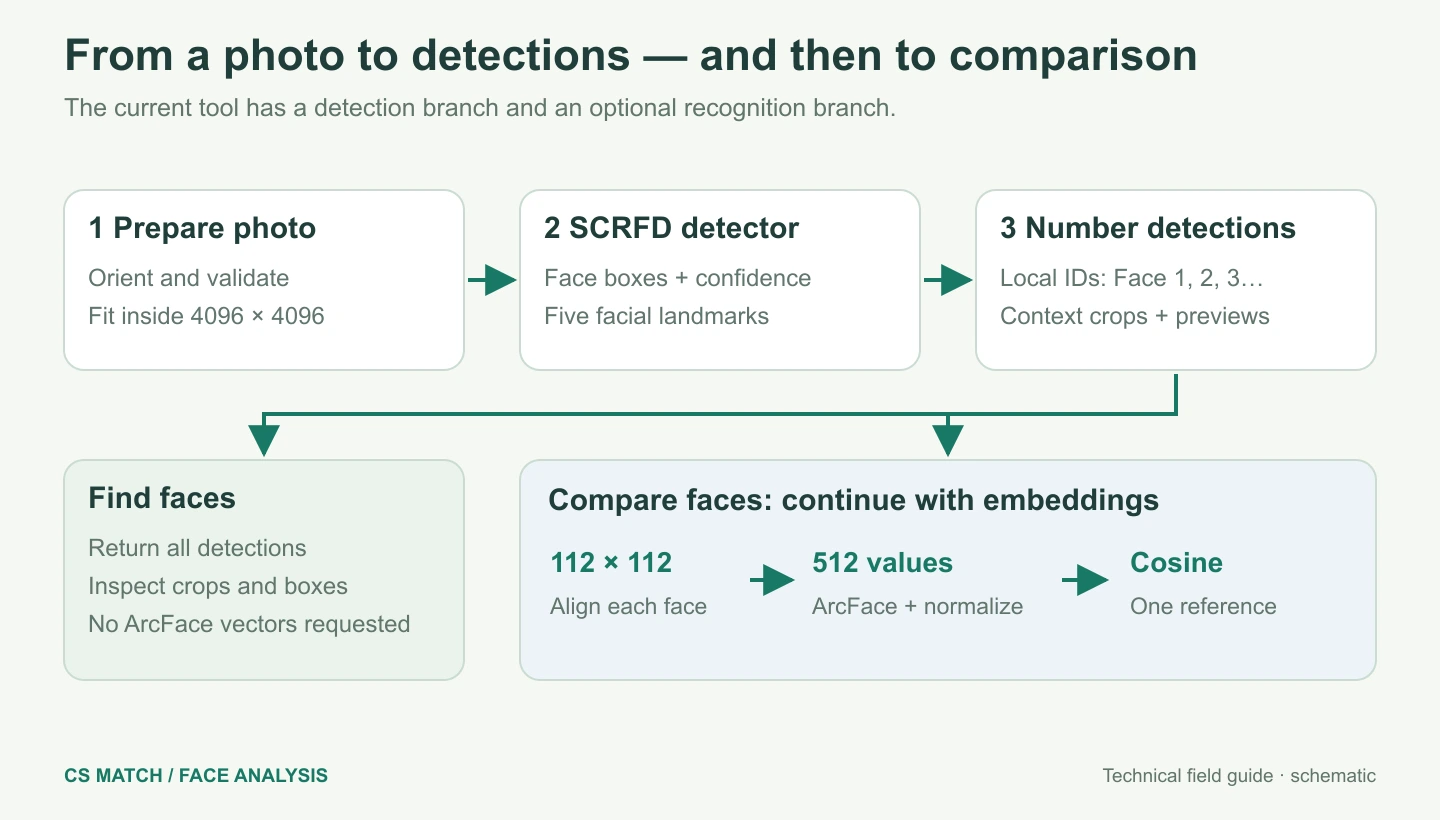
Implementation checked · Cyber Search MatchFinding a face and comparing a face are separate operations. SCRFD locates candidate faces; comparison additionally aligns each face and runs an ArcFace recognition model. The portrait shown in the interface is a context crop, not the small aligned tensor used by that model.
Three questions, three different operations
Face Analysis starts with the question “Where are the faces in this photo?” Find faces takes one still image and returns numbered detections, individual crops and detection-confidence values. It does not need a reference or search the public image index. A group photo can contain many detections, and repeated images of one person still count as separate detections.
Compare faces asks a different question: “How similar is each detected face to this selected reference?” It needs two photos and a chosen reference person. Face Search is a third operation: looking for visually close representations in the public index. The Search this face action connects these workflows, but detection by itself does not identify a person or start a database search.
Prepare the pixels before detecting faces
The application accepts still JPEG, PNG and WebP files. Each uploaded photo is limited to 8 MiB and 20 million pixels. The server checks the decoded format and image size; renaming a file extension does not turn it into an accepted image. Animated or unreadable inputs are rejected before face inference.
Image preparation applies the stored orientation, fits the image inside a 4096 × 4096 boundary without enlargement, and creates a JPEG for analysis. A separate preview fits inside 1600 × 1600. The analysis image and display preview therefore need not contain the same number of pixels, even though the interface maps the numbered boxes back to the same image proportions.
This reduction matters for large group photos. A face occupying only a small part of an enormous original can become smaller in the analysis image. More megapixels do not automatically mean more usable facial detail. Splitting a dense crowd into smaller, overlapping regions may preserve more useful pixels per face, provided you check for repeated detections across those regions.
| Representation | Current purpose |
|---|---|
| Prepared image · longest side up to 4096 px | Detection and, in Compare, alignment from the prepared image |
| Display preview · longest side up to 1600 px | Overview photo with numbered boxes |
| Person crop · fits inside 768 × 768 px | Inspect a detection and hand its context to Face Search |
| Tiny crop preview · fits inside 48 × 48 px | Lightweight preview while a larger image loads |
| Aligned face · 112 × 112 RGB pixels | Input to the recognition model during comparison |
SCRFD finds boxes and facial landmarks
The current worker loads scrfd_2.5g_bnkps.onnx, a SCRFD detector with keypoint output. For each retained candidate it supplies a bounding box, a confidence score and facial landmarks. A configurable detection threshold controls which candidates are returned. Detection confidence describes the detector’s assessment of a face-shaped region; it is not a similarity score, an identity probability or a quality certificate.
SCRFD is the detection architecture described by its authors through sample and computation redistribution. In this project it is executed as a pretrained ONNX model. That research explains the detector family; its published benchmark figures are not measurements of CS Match uploads or a guarantee that our current deployment will find every face.
The multi-face route sorts detections by their top coordinate and then their left coordinate before assigning Face 1, Face 2 and so on. Those numbers are identifiers within this analysis, rather than permanent person IDs. A new crop or a changed detection can change the numbering. More than 200 detections produces an explicit request to split the image instead of silently dropping the extra faces.
The visible person crop and the model crop differ
The portrait shown next to a detection includes context around the bounding box. The crop expands around the face, tries to keep a portrait-like shape and stays inside the source image. In group photos, extra adjustments try to exclude neighbouring face centres. This produces a useful inspection image without pretending that the detector box covers the whole person.
That context crop is reduced for display and has a small preview. It is also the image handed to Face Search. The adjustment is not a segmentation mask and cannot guarantee that no second face remains in a close, overlapping group. Face Search detects the face again and expects one face in its input.
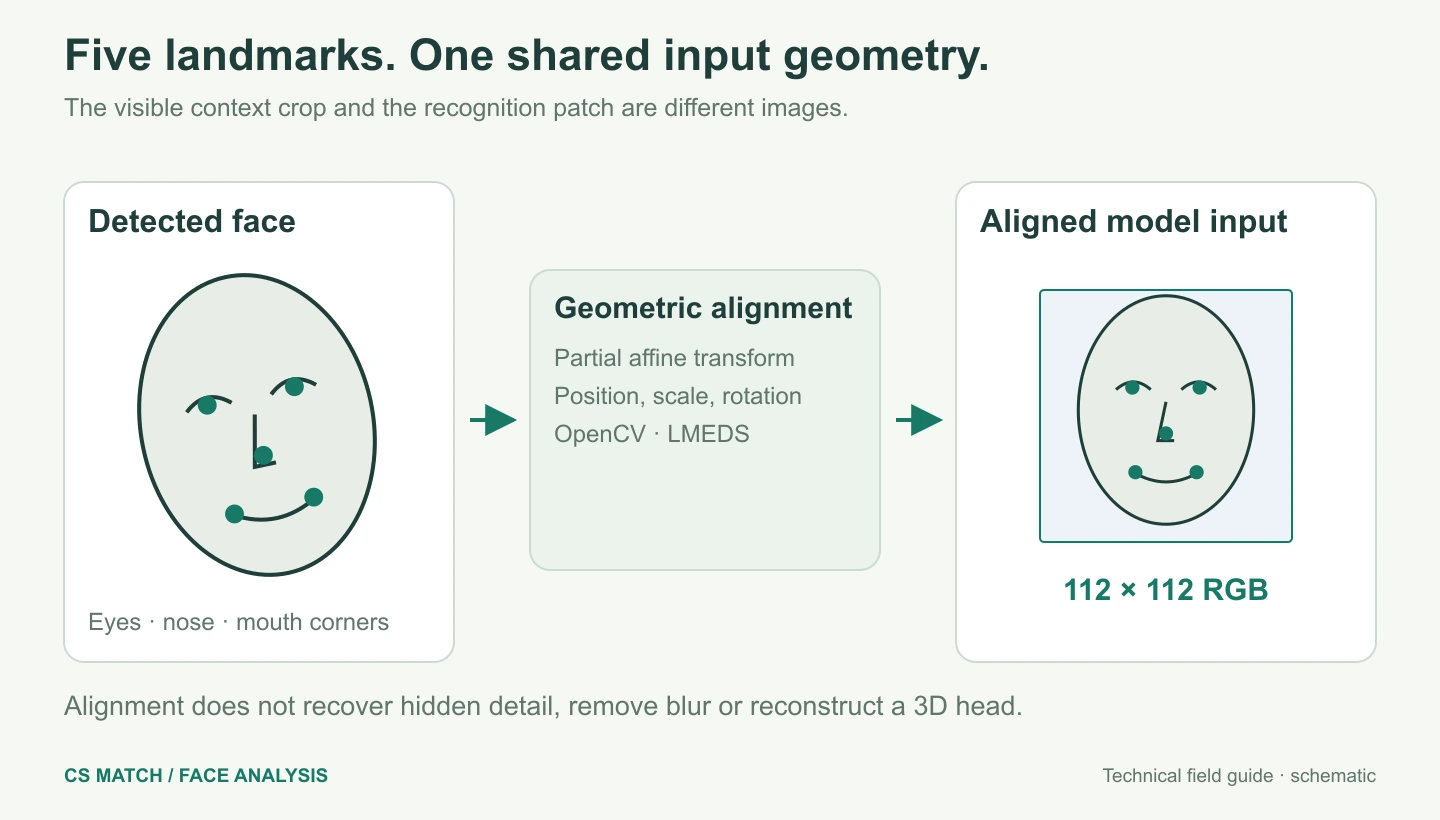
During Compare, the recognition input is built separately from the prepared image and the detected landmarks. The model does not compare the two visible rectangular thumbnails pixel by pixel. Clothing, crop borders and the surrounding scene may be visible in the report, but the recognition stage receives an aligned facial patch.
Five points put the faces into a common coordinate system
The worker uses five landmarks: the two eyes, nose and two mouth corners. OpenCV estimates a partial affine transform from those points to a fixed template, using the LMEDS method. The source image is then warped into a 112 × 112 patch. This adjusts position, scale and in-plane rotation so comparable facial regions occupy comparable input locations.
Alignment is a geometric preprocessing step. It does not reconstruct a hidden eye, turn a profile into a measured frontal view, recover blur or create a 3D head model. Pixels outside the transformed source are filled with zero. Missing or unsuitable landmarks can prevent a valid alignment; a detected box alone is not enough to produce a useful comparison.
Find faces requests detections without embeddings, so it does not run the ArcFace representation stage for every detection. Compare requests embeddings and attempts alignment for each face. An alignment failure can leave the source detection visible while its comparison is unavailable. A reference that cannot yield a valid vector must be replaced.
Inspect the result before searching or comparing
Check the original photo, the numbered box and the person crop together. A plausible crop can still represent the wrong person if the selected reference or face number is misunderstood. The fullscreen viewer preserves image proportions; enlarging the display helps inspection but does not increase the information supplied to the model.
Find faces now shows a compact table of the first five detections beside the photo. More moves to the complete list. Each row or full card can open Face Search with that person crop. If no face is returned, try a clearer source or a less crowded region rather than treating the absence of a detection as evidence that no person appears in the image.
Questions about this workflow
Does a numbered box mean the person has been identified?
No. It marks a detected face region and links it to a crop. Identification is not established by detection.
Does Find faces calculate a recognition vector for every face?
The current Find faces route requests detections without embeddings. Compare additionally requests alignment and recognition vectors.
Why does the crop look different from the image used by the neural network?
The report shows a context crop for inspection. Comparison uses a separate landmark-aligned 112 × 112 RGB patch.
Understand the pipeline, the vectors and the limits.
Face vectors, ArcFace and the recognition model
Understand our 512-value face embeddings, RGB preprocessing, L2 normalization, angular similarity and the difference between model training and inference.
How a face is compared with a reference
Follow our exact comparison request: reference selection, two inference passes, cosine similarity, the 0.45–0.72 display scale and report decisions.
Face comparison errors, accuracy and practical limits
Diagnose false matches, missed matches and unavailable comparisons. Learn what image quality changes, how to test results and why a score is not identity proof.