
Container vs Codec: What Actually Changes a Media File
Understand file extensions, encoded video and audio tracks, and the difference between copying streams and re-encoding.
Updated · Cyber Search MatchThe container holds tracks and metadata; a codec describes how a track is encoded. Choose both for the destination. Renaming .mkv to .mp4 changes neither the container structure nor the encoded signal.
Read the source properties first.
Source details separates Container, Video and Audio. Open Tracks and metadata to see additional audio, subtitle and cover streams. Two MP4 files can use different codecs and behave differently on the same device.
Keep the distinction concrete: MP4 and MKV are containers; H.264 and HEVC are video codecs; AAC is an audio codec. Resolution, frame rate and bitrate are further properties, not alternate names for the codec.
| Property | What it describes |
|---|---|
| Container / extension | How tracks and metadata are packaged |
| Video codec | How images are encoded |
| Audio codec | How sound is encoded |
| Bitrate / resolution / fps | Encoding budget, image dimensions and cadence |
Choose copy or re-encode for each task.
Copying a compatible stream preserves its encoded data while changing how it is packaged or trimming it. Re-encoding produces a new encoded track, allowing image and audio processing. Compatibility is checked against the available output profiles.
For a viewing copy, MP4 with H.264 video and AAC audio is a useful starting profile to test on the intended device. For a multitrack working file, MKV may be appropriate. Neither choice promises universal playback or preservation of every feature in the source.
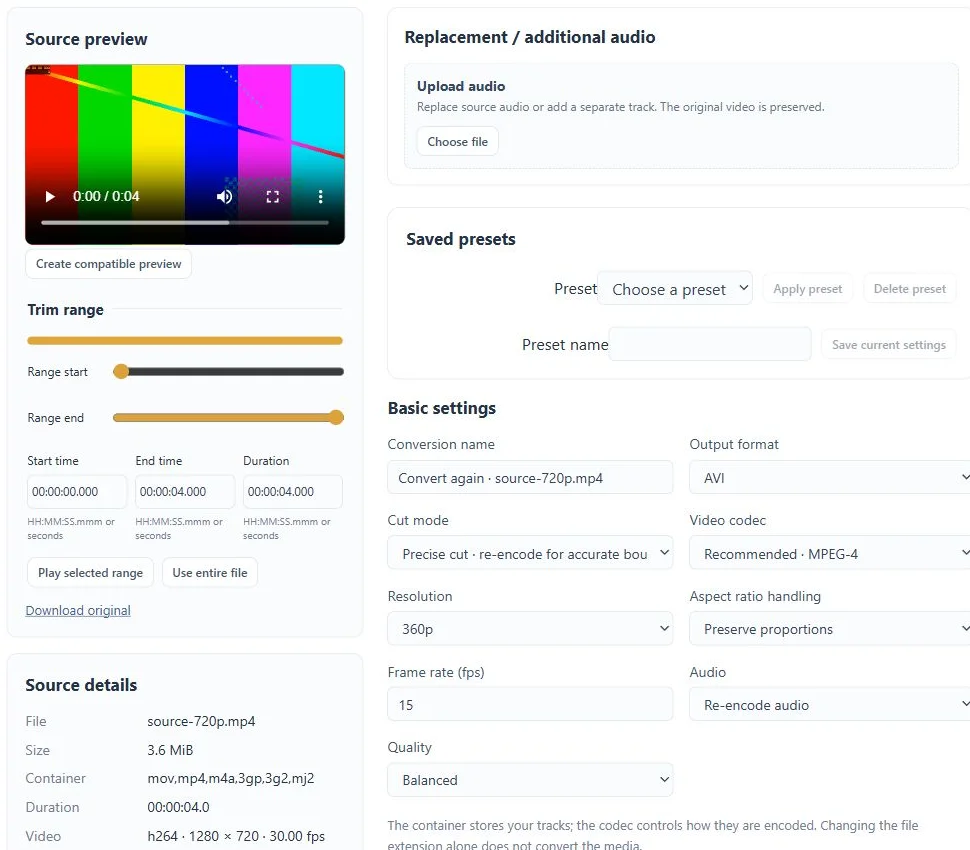
Treat the other tracks deliberately.
Select the audio language or stream you need. An audio-only output removes the video rather than turning its images into sound. Subtitle compatibility depends on the destination container; separate subtitle streams and text burned into the image are different things.
Lossless audio output does not restore detail removed by an earlier lossy recording. Likewise, increasing a video’s dimensions cannot recreate missing source detail. Keep the source for future processing and use a separate delivery copy.
Verify the combination, not only the extension.
Review the completed file’s codec, dimensions, duration, audio tracks and size. Open it on the device or browser that matters. If only the web player fails, try a compatible preview before concluding that the requested output is corrupt.
Mozilla’s media-format reference explains why browser support depends on both the container and its tracks. Device and operating-system support still needs an actual playback check.
Before you finish
- The destination can decode the chosen video and audio codecs.
- The needed tracks survived the conversion.
- The completed download plays on the intended device.
Questions about this workflow
Can I just change the extension?
No. Use a conversion or compatible stream-copy operation to write a valid output container.