
Prepare a Video for Sharing: Smaller, Clear and Playable
Trim an oversized clip, set a sensible size and resolution, and verify the actual file before sending it.
Updated · Cyber Search MatchKeep the original, trim to the useful moment, choose a size budget and compatible viewing profile, then check the completed download on the recipient’s type of device.
Step 1 — define what the recipient needs.
Check the destination’s current attachment allowance and supported playback formats. Decide whether the recipient needs the whole recording, a brief excerpt, intelligible speech or readable small text. That decision matters more than selecting the smallest available resolution.
For a hypothetical two-minute explanation under a 25 MB allowance, try a 22 MiB budget with a single encoded audio track. This is a worked starting point, not a claim about any messaging service’s current limit.
Step 2 — shorten before compressing.
Upload the local source and inspect its duration, orientation and tracks. Use the trim range to remove setup time and irrelevant ending material. Choose Precise cut if the boundary matters or you will resize or change encoding settings.
Keep the audio language the recipient needs and remove redundant tracks only after checking them. If every moment is necessary and one small file is impractical, split into clearly ordered parts rather than making the entire recording unreadable.
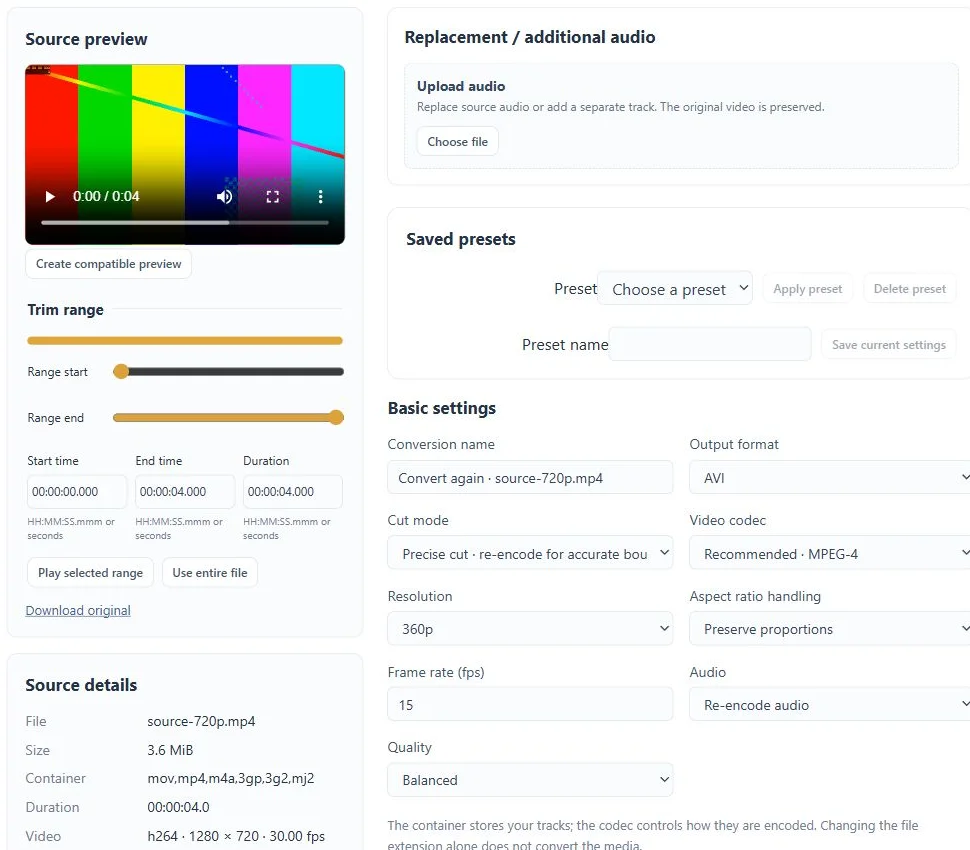
Step 3 — spend the remaining bits deliberately.
Select a viewing profile such as MP4 / H.264 / AAC and test it on the intended device. Start at 720p for a general viewing copy, or try 480p for a simple scene when detail is less important. Preserve aspect ratio and avoid enlarging a smaller source.
Open Advanced settings, choose Target file size and set a known constant audio bitrate. Review the estimate and save the task. A short processed preview can reveal unreadable text or poor framing; it cannot guarantee final size or whole-file quality.
Step 4 — check and send the requested file.
Wait for Completed, compare actual size and duration, and play the beginning, a busy middle section and the ending. Listen for intelligible sound and check sync. Download the requested output, not its separate lightweight preview.
If it is too large, lower the budget or shorten the range and convert again. If it fits but important details are lost, choose a shorter excerpt or a different delivery method. Download useful results before the displayed retention period ends.
Before you finish
- The download fits the destination’s limit.
- Important picture detail and speech remain useful.
- The recipient’s playback environment was considered.
Questions about this workflow
Is 360p always the best choice for sending?
No. A smaller frame may hide text or fine detail. Choose the lowest resolution that still serves the recipient’s task and verify the output.