
Face recognition in phones, payments and online identity checks
Compare Face ID, payment passkeys, face-based checkout and selfie-to-ID verification, with documented examples from Apple, Visa, Mastercard, Stripe and AWS.
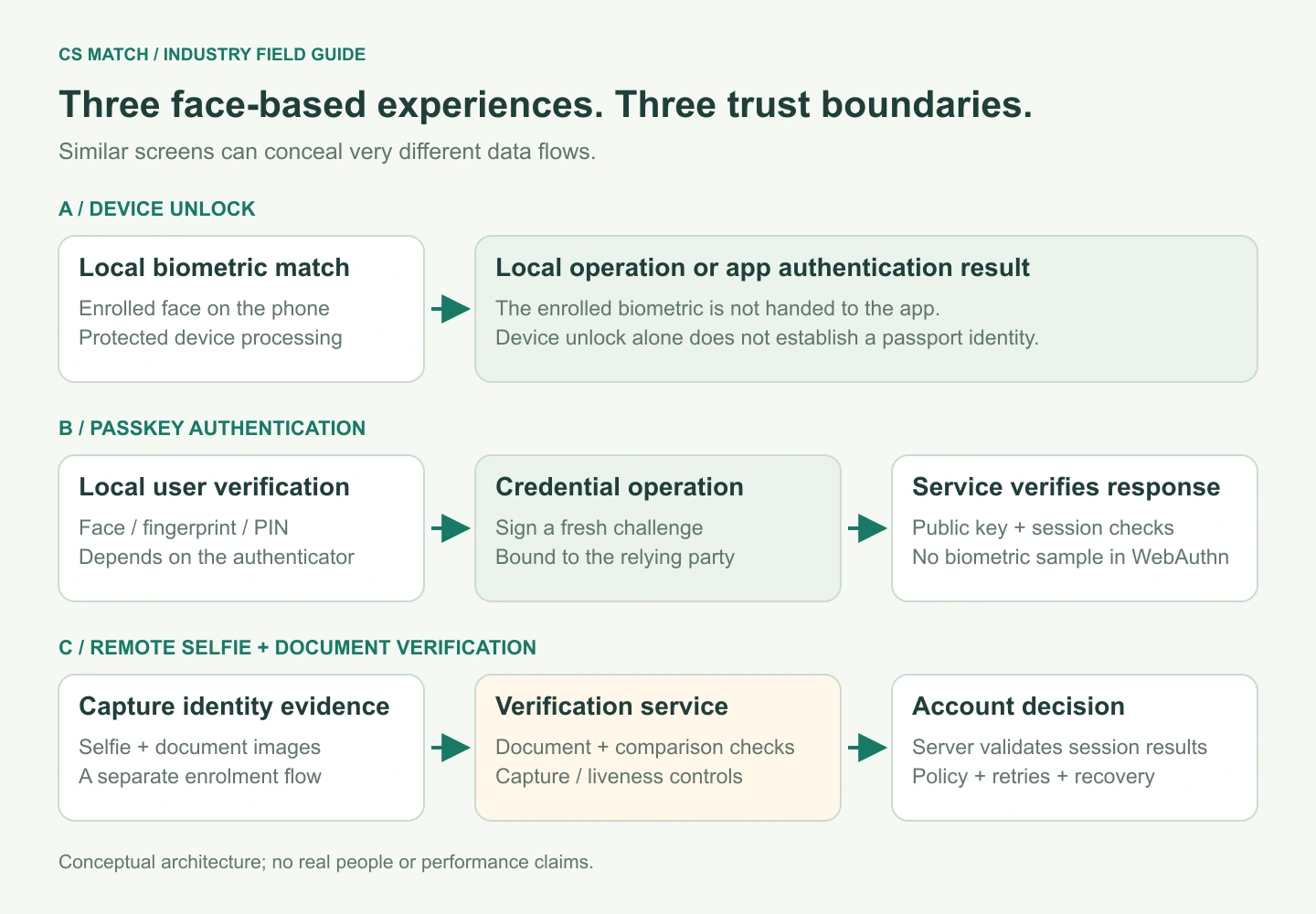
Sources checked · Cyber Search MatchA face can unlock a device, activate a payment credential or be compared with an identity document. These experiences look similar to a user but have different trust boundaries. Some keep biometric processing on the device; others deliberately send a selfie for remote verification. A successful face comparison is only one part of an identity or payment decision.
Recognition, proofing, authentication and authorization
Recognition compares visual representations. Identity proofing connects a person to identity evidence during enrolment. Authentication checks control of an enrolled account or credential in a later interaction. Authorization decides whether a specific action is allowed. One system may use a face in several of these stages, but success in one does not automatically settle the others.
Consider a new customer opening an account and later making a payment. The onboarding flow may inspect an identity document and compare its portrait with a captured selfie. Later, the customer may authenticate a passkey using a device face unlock. The payment system still applies transaction rules and decides whether to authorize the charge. It need not repeat the document comparison on every purchase.
This distinction is useful when reading claims about paying with your face. The phrase can mean a local biometric check, a remote enrolment check or a face-linked checkout service. Ask what reference is used, where the matching happens and what the server actually receives.
| Experience | Reference or credential | What the face contributes |
|---|---|---|
| Device unlock | Locally enrolled biometric data | Local user verification |
| Passkey sign-in or payment | Public-key credential registered with the service | Local activation of credential use |
| Selfie-to-document check | Portrait in identity evidence | Remote comparison during proofing |
| Face-linked checkout | Customer enrolment linked to a payment credential | Part of a dedicated checkout flow |
Why Face ID is more than a selfie matcher
Apple describes Face ID as using TrueDepth depth information and infrared imagery, with matching protected by the Secure Enclave. Its enrolled face data remains on the device. Apps using Face ID are notified of authentication success rather than receiving the enrolled biometric data. The hardware capture path and protected processing are therefore part of the product, not just the recognition network.
That architecture differs from uploading two ordinary photographs to an online comparison tool. A still-image embedding can measure resemblance, but it does not acquire the same depth evidence, inherit the device’s hardware protections or establish the same authentication policy. A public benchmark for a photo recognizer cannot be substituted for a phone authenticator’s security evaluation.
The Android biometric API likewise distinguishes supported authenticator types, including Class 3 strong biometrics, Class 2 weak biometrics and device credentials. Its BiometricPrompt can participate in cryptographic operations through a CryptoObject. “Face unlock available” is therefore not enough to assume that every Android device or app supports the same assurance or transaction behaviour.
Passkeys can use your face without sending it to the website
A passkey flow uses a public-key credential registered for a service. The service issues a challenge; an authenticator produces a signed response after the required local interaction. The server verifies the response using the registered public key. Local user verification may use a face, a fingerprint or a device PIN, depending on the authenticator and policy.
WebAuthn explicitly separates local biometric recognition from the relying party: biometric data is not revealed to the website through that protocol. FIDO’s explanation also distinguishes synced passkeys from device-bound passkeys. Saying that biometric matching stays local should not be confused with saying that every passkey credential can never be synchronized.
The website normally receives a cryptographic assertion and a user-verification signal, not a face photograph, embedding or universal facial identity. That protects a different boundary from a remote selfie service. It also means the website should not infer that the person’s passport identity has just been established merely because a credential was used successfully.
Enrolment and recovery still matter. The service needs to bind the right credential to the right account, handle lost-device recovery and verify a fresh challenge for the intended relying party. A browser animation or a client-side “face recognized” message is not equivalent to a server-verified authentication response.
Visa and Mastercard illustrate different payment experiences
Visa Payment Passkey applies FIDO-based authentication to participating online payment flows. Visa describes a one-time setup and the use of a face, fingerprint or device PIN for subsequent authentication. This is an example of using an existing device authenticator to confirm credential use, rather than asking a merchant to run its own face gallery search.
Mastercard documents a biometric checkout pilot with PayFace at the Brazilian grocery chain St. Marche. Customers used facial recognition in the checkout experience. That is a documented example of face-based in-store payment, but the case study does not establish that every Mastercard transaction, market or merchant supports that flow.
These examples show why provider names alone do not define the architecture. A payment network can support local passkey authentication, a partner-led biometric checkout program and other payment experiences. Availability depends on the product, merchant integration, participating institutions and market; a published pilot should remain labelled as a pilot.
Neither example means that a merchant can replace its payment integration with a cosine threshold. Payment credentials, enrolment, transaction handling and the provider’s decision process remain part of the service. Matching a face to an account is different from confirming that the account may fund the transaction.
Stripe Identity: a selfie linked to document evidence
Stripe Identity’s selfie-check documentation describes a document-verification session that can require a matching selfie. The flow collects a government-issued photo ID and a selfie. Its report exposes document and selfie check results separately; the session can require further input when checks fail. This is remote identity verification, not an invocation of the user’s local Face ID enrolment.
Separating the results is useful because the failure modes differ. A document may be unsupported or expired; a selfie may fail to match the document portrait or be unusable. The product should explain the next useful step rather than reducing every failure to “wrong person.” A repeat capture, another supported document or a reviewed alternative may address different problems.
Online financial accounts, marketplaces, mobility services and account-recovery flows can all have reasons to request identity evidence. That is a class of use cases, not a statement that every provider uses the same check. The operator must decide what evidence is needed and how it relates to the requested service; a matched portrait does not independently validate every document field or account claim.
A familiar face and a live capture answer different questions
Face comparison asks whether two representations are sufficiently similar. Liveness or presentation-attack detection asks whether the capture provides evidence of a genuine presentation rather than a substitute such as a replay. A very similar photograph can still be a photograph. Increasing the face-match threshold does not turn a recognizer into a liveness detector.
AWS documents Rekognition Face Liveness as a separate video-selfie workflow. It returns a liveness confidence score and a reference image that can be used for a subsequent comparison. The documentation notes that results are not perfect and should be used with other factors. This separation makes the two questions explicit: capture evidence first, similarity evidence separately.
Capture integrity is another boundary. A live-looking result does not eliminate the need to trust how media reached the processing service or how the result was attached to a session. Systems need controls that bind the capture, result and intended interaction together. This is broader than choosing a stronger feature extractor.
NIST’s authentication guidance treats biometrics as part of a larger authentication system, with a physical authenticator, an alternative non-biometric option and facial presentation-attack detection requirements in its scope. It is a useful architectural reference, not a blanket certification of a vendor or of our photo-comparison tool.
How a production online flow connects the pieces
An onboarding system first creates a server-side session associated with the intended account and purpose. The capture or provider flow produces results for that session. The server then applies its decision policy, records the outcome and returns only the next step the user needs. A status in the browser is presentation; the authoritative result should come from a validated server-side flow.
A payment authentication flow adds a separate transaction context. Confirming control of a credential does not settle available funds, merchant acceptance or all fraud signals. A payment can be authenticated and still declined; a transaction approval rate is not a face-recognition accuracy metric. Keeping those measures separate prevents misleading comparisons between model benchmarks and business conversion statistics.
An asynchronous result also needs a defined lifecycle. Repeated callbacks, retries, expired sessions and a user abandoning capture should not produce contradictory account states. The operation should have an identifiable purpose, a reproducible decision and an auditable link to the evidence that was actually checked.
Data boundaries and recovery shape the user experience
A local biometric authenticator and a remote identity-verification session have different data handling. In the former, the website need not receive the biometric sample through the authentication protocol. In the latter, images may deliberately be processed by the verification provider. A clear product explanation should identify which flow is being used and what evidence is retained.
The design also needs an alternative for a person who cannot complete the capture or access the original device. Lighting, camera capability, accessibility needs and appearance changes can affect completion. A failure should lead to a proportionate retry or another legitimate route, rather than an endless loop through the same failed capture.
Recovery is part of security, not just customer support. A beautifully protected biometric login is weakened if account recovery can bind a new credential without adequate evidence. Conversely, an overly restrictive recovery process can lock legitimate users out. Evaluate ordinary success, capture failure and recovery together instead of optimizing only the first-use demonstration.
What to ask before calling a solution accurate or secure
Ask which task was evaluated: document portrait comparison, device authentication, liveness, enrolment or payment authorization. Record the image conditions, operating threshold and denominator. Successful user completion, false matches, attack acceptance and transaction approval answer different questions and should not be merged into one percentage.
Test the whole intended flow on representative supported devices and capture conditions. Keep development data separate from the final evaluation, inspect inconclusive cases and measure the rate of users who need an alternative path. A strong model score is useful evidence, but it is not a measurement of session integrity, recovery quality or the payment decision.
For a buyer or integration team, a useful provider comparison covers capture requirements, processing location, supported documents and markets, result semantics, retention, fallbacks, latency and the scope of independent evaluation. The right solution fits the transaction and its assurance needs; the most recognizable algorithm name is not a complete selection criterion.
| Measure | What it describes | What it does not establish |
|---|---|---|
| Face-match errors | Comparison performance at a threshold | Liveness or legal identity by itself |
| Liveness errors | Capture / attack-detection performance | Correct document or account binding |
| Completion rate | Users finishing the defined flow | Recognition error rate |
| Payment approval | Outcome of payment processing | Biometric model accuracy |
Where CS Match fits in this landscape
CS Match provides inspectable face detection, photo-to-reference comparison, all-pairs comparison and public photo-source search. These tools make the recognition stage understandable: the user can inspect the selected face, reference crop, raw vector score and original image. They are useful for exploring visual similarity and evaluating the quality of an input.
The current Face Analysis tool does not provide document verification, a liveness challenge, payment authorization or a Face ID-compatible authenticator. Its comparison percentage is a display scale rather than a credential or certification. Using an established ArcFace representation is a sensible component choice for this purpose; it does not supply the additional layers of an identity-proofing or payment product.
That boundary makes the comparison useful without overstating it. Try a permitted pair of photos to understand alignment and score behaviour, then evaluate any production identity or payment service against its own full workflow and evidence. Our technical guides explain the model layer; these industry examples explain what must surround it.
Questions about this workflow
Does an online payment with Face ID send my face to the merchant?
In a local device-authenticator or WebAuthn flow, the service receives an authentication result or cryptographic assertion rather than the enrolled biometric data. A separate remote selfie flow has different data handling.
Are passkeys always facial recognition?
No. Local user verification can use a fingerprint or device PIN as well as a face, depending on the authenticator and policy.
Is Stripe Identity the same as Face ID?
No. The documented selfie flow compares a captured selfie with document evidence. Face ID is a local device-authentication system.
Can CS Match authorize a payment or complete an identity check?
The current tool compares images and supports photo-source research. It does not provide payment authorization, document verification or liveness checks.
Do these examples prove every payment provider has adopted facial recognition?
No. They document specific products and a named pilot, checked October 16, 2026. Availability and architecture vary by service and market.
Understand the pipeline, the vectors and the limits.
How face detection and alignment work
Follow a photo through CS Match: image preparation, SCRFD detection, five facial landmarks, person crops and 112 × 112 alignment for comparison.
Face vectors, ArcFace and the recognition model
Understand our 512-value face embeddings, RGB preprocessing, L2 normalization, angular similarity and the difference between model training and inference.
How a face is compared with a reference
Follow our exact comparison request: reference selection, two inference passes, cosine similarity, the 0.45–0.72 display scale and report decisions.
Face comparison errors, accuracy and practical limits
Diagnose false matches, missed matches and unavailable comparisons. Learn what image quality changes, how to test results and why a score is not identity proof.
Pretrained face models: training, benchmarks and real-world use
Understand how ArcFace models learn, how published accuracy is measured and how CS Match turns a fixed checkpoint into a practical face-comparison workflow.
ArcFace and the alternatives: choosing a practical face pipeline
Compare ArcFace, FaceNet, CosFace, AdaFace, MagFace and detector sizes. See why CS Match combines an R50 recognizer with rotation-aware detection and inspectable reports.
Face recognition in CCTV: from video frames to reviewed evidence
Explore face recognition in security-camera footage, controlled access and video archives: detection, tracking, gallery search, image quality and operational evaluation.