
Transcription vs Diarization: Words and Speaker Turns
Understand transcripts, numbered speaker segments and reference voice comparison, and review them against the original recording.
Updated · Cyber Search MatchTranscription estimates what was said. Diarization groups when each apparent speaker spoke. Neither assigns a verified name. The current Audio Analysis workflow combines these with reference comparison and requires two source files.
Read three outputs as three different questions.
A transcript can have correct words but an incorrect speaker boundary. A diarization can separate turns while the words contain errors. Reference comparison asks about technical voice similarity, which is another signal rather than a name-verification step.
Speaker 1 and Speaker 2 are labels within a task. They are not persistent identities across jobs. Automatic speaker count and turn boundaries need listening review, especially with overlapping voices or a single speaker whose delivery changes.
| Output | Question answered |
|---|---|
| Transcription | What words does the model estimate? |
| Diarization | Which apparent speaker speaks during each interval? |
| Reference comparison | Which analysed speech is technically similar to the reference? |
Prepare the two required sources.
In the current interface, two source files are required: an analysis recording and a reference voice sample. This also applies when your main interest is a transcript. Supported video can be used as a sound source after extraction; visual frames are not analysed by this audio task.
Use an appropriate clear single-speaker reference when comparison matters. Using the same recording in both inputs is a self-comparison, not an independent speaker check. The example report’s high scores must not be treated as an accuracy benchmark.
Listen at boundaries and important words.
Open Dialogue transcript and compare its time ranges with the audio. Listen before and after a speaker switch. Names, numbers, dates and negations deserve a direct check against the recording before you reuse the text.
A segment’s timestamp helps you locate speech; it does not guarantee a sample-exact word boundary. Note the intervals that need correction. The current report is a review surface, rather than a full collaborative transcript editor.
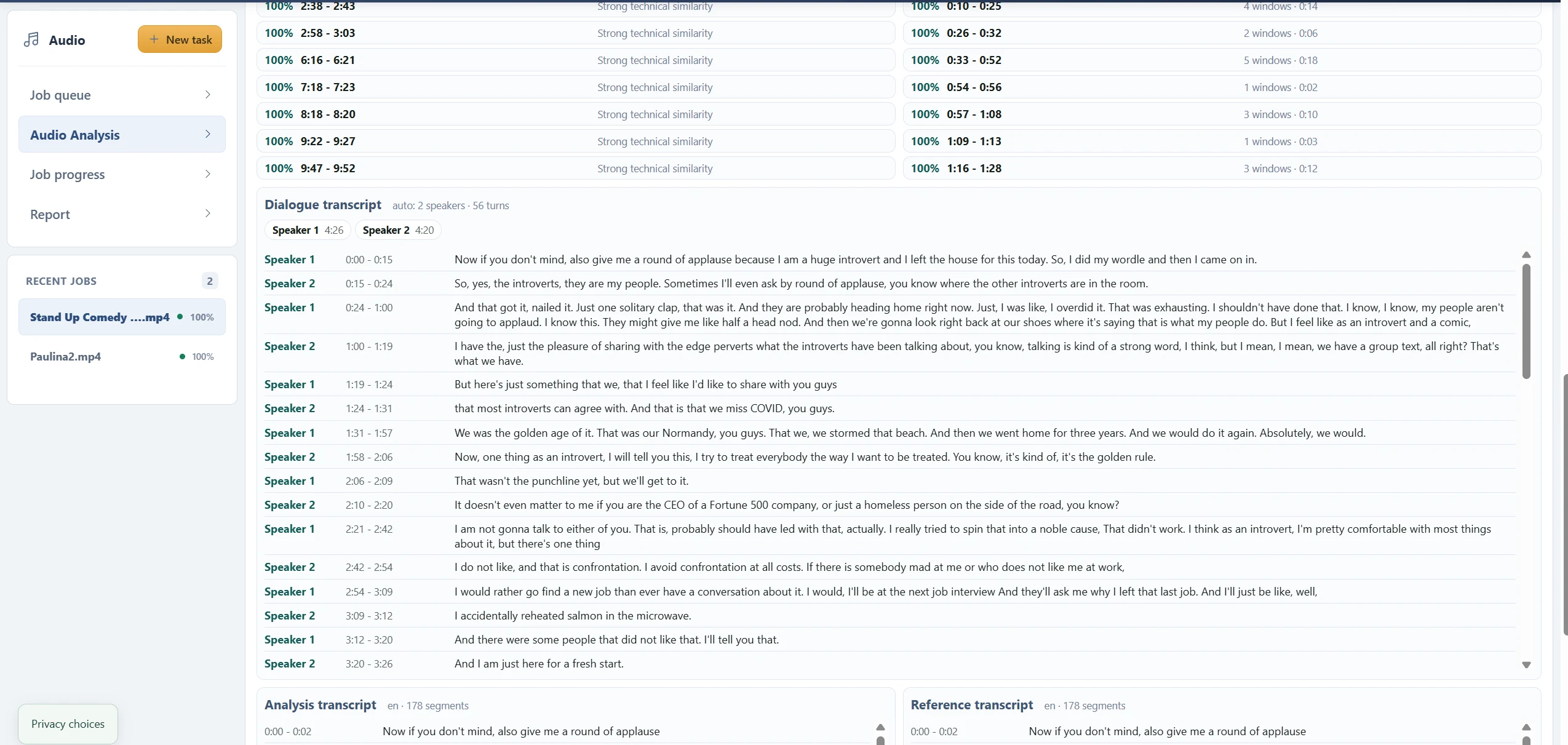
Choose the next action based on the problem.
For unclear words, inspect the source’s language, noise and overlapping speech. For inconsistent speaker labels, review turns and the speaker-count choice. For an unexpected voice match, inspect the reference quality and the underlying segments.
Keep the original recording with your review notes. Transcription and speaker grouping can support navigation and drafting; a technically similar voice is not legal identification or proof of who said a disputed passage.
Before you finish
- Both required sources were supplied deliberately.
- Important words were checked by listening.
- Numbered speaker labels were not treated as verified names.
Questions about this workflow
Can I currently request transcription with only one file?
The current Audio Analysis form requires both analysis and reference sources. The transcription landing pages explain that prerequisite.