
Find and Listen to Audio Speaker Segments
Use speaker labels, dialogue turns, matched windows and timestamps to locate and listen to passages in an Audio Analysis report.
Updated · Cyber Search MatchRead the segment time range, choose the corresponding source player and seek to that position. The current report uses time labels for navigation; dialogue rows are not one-click playback controls.
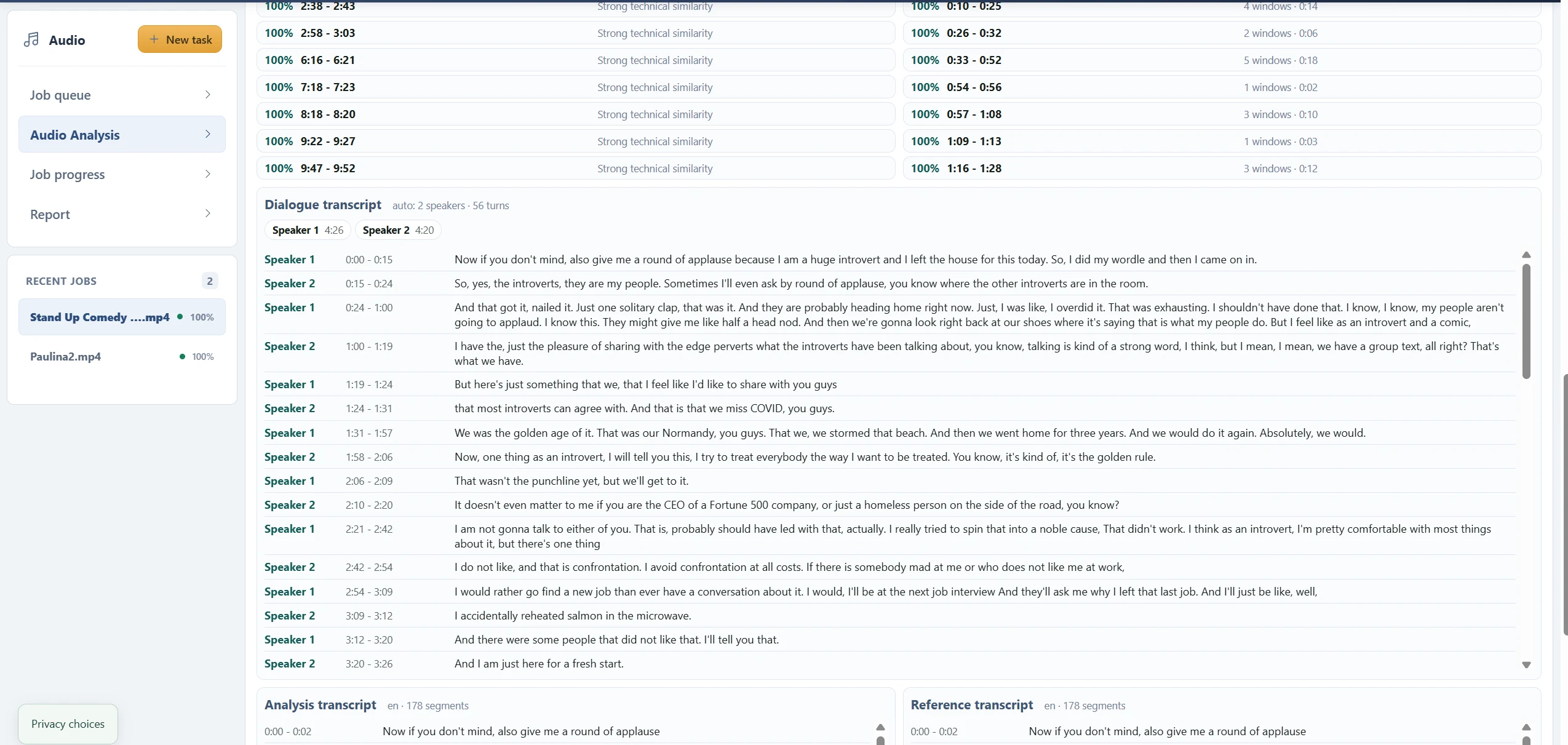
Choose the list that answers your question.
Dialogue transcript follows the recognized conversation with numbered speaker turns. Analysis transcript follows the speech-to-text segments for the analysis source. Reference transcript belongs to the reference source. Similar-looking timestamps in the two transcripts refer to different recordings.
Top matched segments list short analysis windows that resemble the reference most strongly. Merged ranges bring neighboring matched windows together. Neither list is a complete transcript, and a matching window can span more than one recognized text segment.
Seek manually and include context.
Note the start and end times, open the appropriate audio player and seek to the start. Listen a little before and after the passage when possible. The player contains the submitted or extracted audio, while the report rows describe selected intervals within it.
A timestamp such as 2:58–3:03 describes minutes and seconds, not a wall-clock time. If the source was cut before upload, those times belong to the cut file. Do not add durations from overlapping windows as though they were separate speech events.
Check the voice before trusting the label.
Speaker 1 and Speaker 2 are labels for acoustic groups within one task. Auto may overestimate or underestimate the actual number of people. Compare the sound at multiple turns, especially near interruptions, laughter, edits and background voices.
If a known count is available, rerun a representative excerpt with that count and compare the results. Changing the count can improve grouping but does not resolve unclear audio or independently identify the speakers.
Questions about this workflow
Do I need a reference file just to transcribe?
Yes, in the current workflow. Select an analysis source and a reference source before starting. There is no separate one-file transcription mode yet. For a meaningful voice comparison, use a clean sample of the voice you want to compare.
Can I close the tab?
Keep the tab open until both uploads and submission finish. Processing then continues in the background; return to your Audio task list for progress and the report.
Continue with the next useful step
How to Read an Audio Analysis Report
Understand source players, quality indicators, transcripts, speaker groups, voice similarity and signal charts in the current Audio Analysis report.
What Voice Similarity Scores Mean
Understand best score, top 5 median, matched speech, speaker summaries and technical similarity labels without treating them as identity probabilities.