
Find the turn. Listen to the speaker.
Group speech into numbered speaker turns and timed segments. Inspect the dialogue transcript and check automatic assignments against the recording.
Free account · No card required · Background processing after upload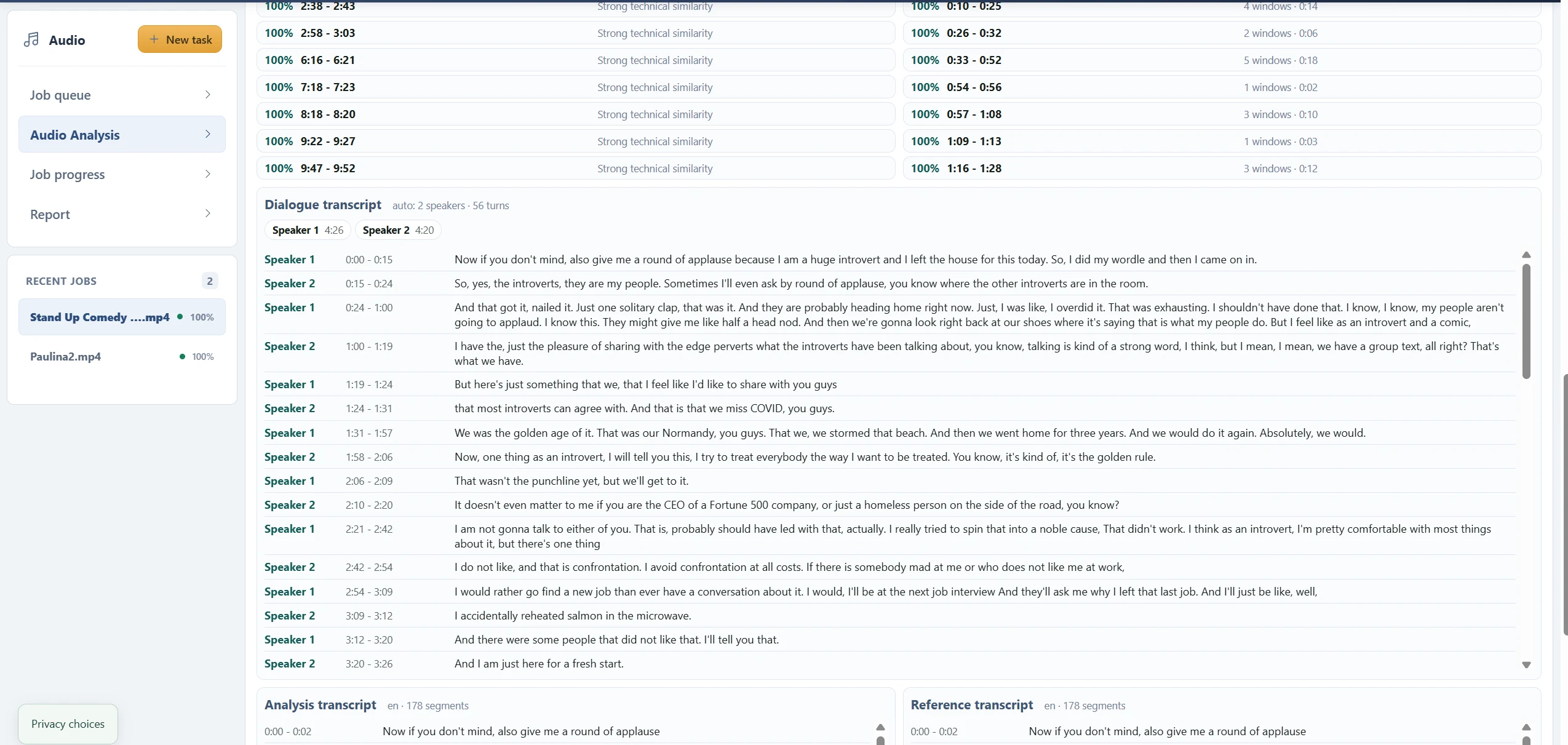
From two sources to a report you can inspect.
- 01
Choose the analysis source
Upload the audio recording, or select a video and confirm audio extraction.
- 02
Add the reference
Supply a voice sample; it is required by the current analysis workflow.
- 03
Set the speaker count
Choose Auto or a known count from 1 to 5, then review both sources.
- 04
Submit and follow progress
Finish uploading and let the background task build the report.
- 05
Read and listen
Compare timestamps, speaker turns, quality indicators and the original sound.
Choose Auto, or supply a count you know.
Auto estimates speaker groups from the available speech windows. If you know the number of speakers, choose 1–5 in Speakers in analysis. A requested count influences clustering; it is not a guarantee that every voice will be separated correctly.
Overlapping speech, laughter, background voices, short contributions and changing microphone quality can merge one person with another or split one person into multiple labels. Start with a short representative recording and listen across several turns.
Speaker 1 is a label, not a name.
Numbered labels belong to this job and do not establish an identity or persist as the same person across other tasks. The example shows Auto: 2 speakers and 56 turns. Those are system assignments to review, not a verified count of participants.
The dialogue transcript aligns recognized text with speaker windows. A text segment crossing a speaker boundary can be assigned imperfectly. Use the adjacent time ranges to listen for the actual change rather than relying on the label alone.
Separate speaker grouping from voice matching.
The reference file supports comparison against speech in the analysis recording. Speaker grouping and reference matching are related report views, but a numbered speaker is not automatically the person in your reference sample.
For a meaningful comparison, use a clean single-speaker reference and review several matching windows. The current wizard still requires that file when your main question is diarization; there is no dedicated reference-free mode.
Questions about this workflow
Do I need a reference file just to transcribe?
Yes, in the current workflow. Select an analysis source and a reference source before starting. There is no separate one-file transcription mode yet. For a meaningful voice comparison, use a clean sample of the voice you want to compare.
Can I close the tab?
Keep the tab open until both uploads and submission finish. Processing then continues in the background; return to your Audio task list for progress and the report.
What are the current input limits?
Each upload is limited to 512 MiB. The analysis recording can be up to 30 minutes, and the reference must contain at least 3 seconds of detected speech. Processing, storage and quality checks also apply.
A different question. The same connected report.
Audio Analysis
Analyze speech in audio or video with transcripts, speaker segments, voice comparison, quality indicators and charts in one inspectable report.
Audio to Text
Convert recorded speech into a timestamped transcript inside Audio Analysis. Review the words alongside speaker turns and source playback.
Video to Text
Transcribe the spoken audio in an uploaded video. Confirm audio extraction, add the required reference and review timestamped speech in the report.
Voice Comparison
Compare an analysis recording with a reference voice sample. Review matched speech windows, speaker summaries and recording quality before interpreting similarity.
Listen closer. Read with context.
Find and Listen to Audio Speaker Segments
Use speaker labels, dialogue turns, matched windows and timestamps to locate and listen to passages in an Audio Analysis report.
How to Read an Audio Analysis Report
Understand source players, quality indicators, transcripts, speaker groups, voice similarity and signal charts in the current Audio Analysis report.
What Voice Similarity Scores Mean
Understand best score, top 5 median, matched speech, speaker summaries and technical similarity labels without treating them as identity probabilities.
Audio Transcription Language Support
Check the current English, Ukrainian and Russian configuration, automatic language detection and limitations for multilingual or unclear speech.
See what your media
can do for you.
Create your free accountNo card required. Start with a Free account.