
Find the passage. Keep the frame.
Find vehicle appearances in your video, filter supported types and colors, and review grouped crops and timestamps for the passage you need.
Free account · No card required · Uploaded recordings, processed in the background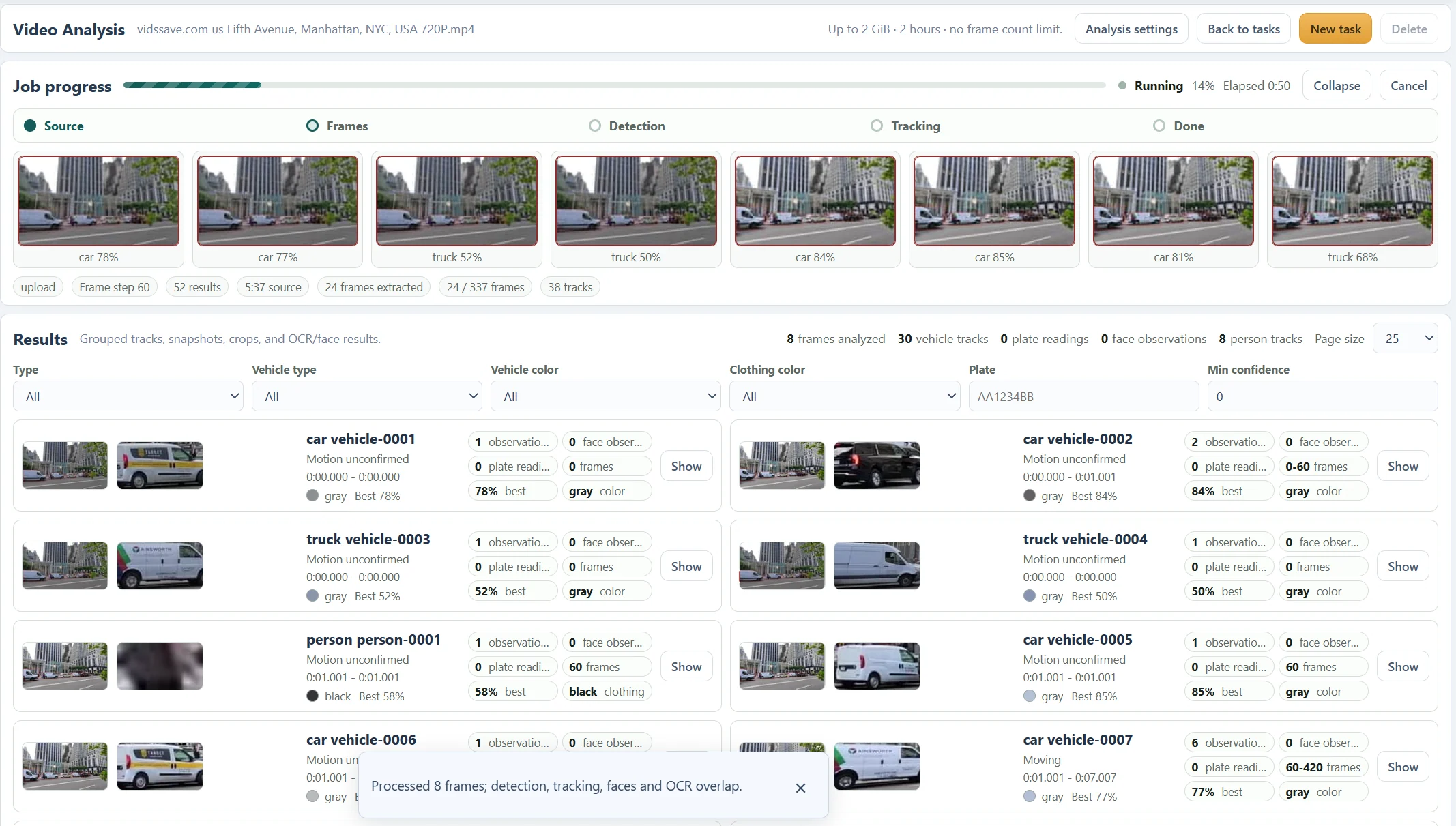
From the source to the useful frame.
- 01
Select the recording
Use a short range containing the road event.
- 02
Cover the passage
Draw an area that includes the vehicle’s useful path.
- 03
Enable Vehicle
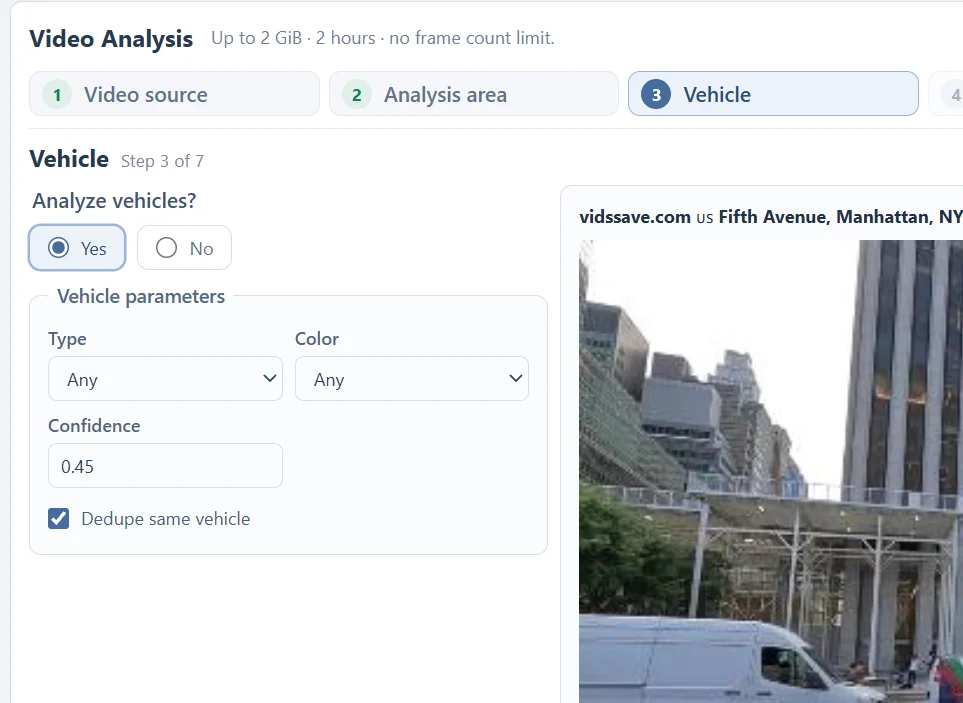
Choose type, color, confidence and deduplication.
- 04
Add plate reading if useful
Use LPR only where the source has enough detail.
- 05
Review the track
Check timestamps, frame context and individual crops.
Set the vehicle question, not just the threshold.
Choose Any, car, truck, bus or motorcycle. Use color when it helps, but remember that lighting, reflections and small crops can change a color estimate. Begin with Any if a narrow filter may exclude the vehicle you need.
Confidence controls which detections are retained. A higher threshold can reduce uncertain detections while missing harder views. Dedupe same vehicle controls repeated vehicle grouping; inspect the observations rather than assuming a card is a guaranteed unique vehicle.
Read a passage across sampled frames.
The street results show vehicle cards with representative crops, observation counts, frame ranges and source times. The screenshot is from a running task, so the displayed track count is provisional.
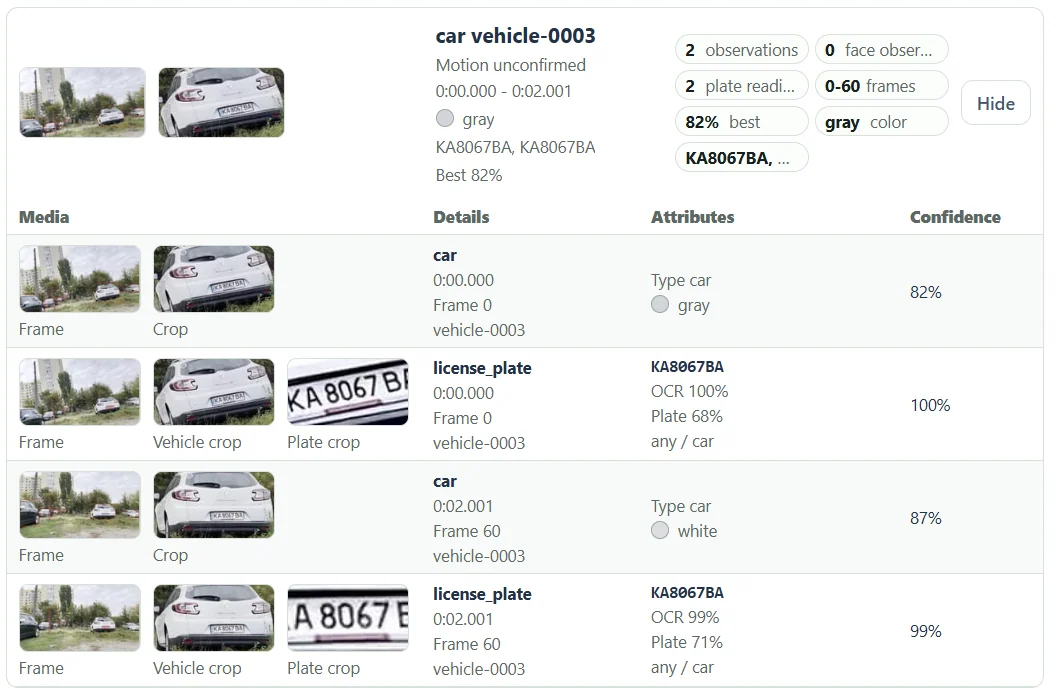
In the separate close-range example, one vehicle group spans frame 0 to frame 60, with timestamps 0:00.000 and 0:02.001. This provides two points to compare, not a continuous reconstruction of everything between them.
Expand the group to compare the full scene, vehicle crop and any plate crops. A van and a nearby car can overlap; checking the scene helps avoid assigning a reading to the wrong object.
If the vehicle is missing, inspect the input first.
Check that Vehicle analysis is enabled, the vehicle is inside the region of interest and the selected time range contains its appearance. A boundary drawn tightly around a parked vehicle may miss another vehicle entering the scene.
Use closer sampling for short passages. Adaptive sampling can add frames around motion in a static-camera recording, but camera motion can make that setting less useful. A clearer original is usually more valuable than increasing resolution after recording.
Questions about this workflow
Can I close the tab while analysis runs?
After the upload and submission have finished, processing runs in the background. Return to the Video task list to check the job and available results. Keep the tab open while the file is still being uploaded.
What are the current source limits?
The current Video Analysis interface accepts files up to 2 GiB and two hours. Processing and storage limits also apply. Analyze a short representative range first when choosing settings.
A useful frame starts with a focused task.
Video Analysis
Analyze an uploaded video without coding. Review vehicle and person tracks, license plate readings, face crops and the timestamps behind each observation.
Object Tracking
Track supported people and vehicles in a submitted video. Compare grouped observations, crops and timestamps without writing detection or tracking code.
Person Tracking
Locate people in an uploaded video and inspect person tracks, clothing colors, source frames and optional face observations in one report.
License Plate Reading
Extract visible license plate text from video frames. Compare OCR readings, detection scores, vehicle crops and timestamps before relying on a result.
Faces in Video
Find face observations inside detected person crops, review their source times and open a selected crop in a separate Face Search.
YouTube Video Downloader
Prepare an available public YouTube video, choose a returned resolution and download the file or use it for Video Analysis. Source restrictions can affect availability.
Read the recording. Understand the report.
Choose a Video Analysis Area of Interest
Use the entire frame, a rectangle or a polygon to focus a video task. Learn how fixed boundaries affect moving subjects and camera movement.
Choose a Video Frame Sampling Interval
Balance coverage and processing with source-frame intervals and optional adaptive sampling. See why short events need closer sampling.
Video Tracks vs Observations: Read the Results
Understand track groups, individual detections, plate readings and face observations without treating track totals as unique people or vehicle counts.
Understand Video Analysis Timestamps and Frame Numbers
Read source times, frame indices and track ranges. Learn how trimming, sampling and variable frame rates affect the times shown in a video report.
Video Analysis File Formats and Upload Requirements
Check size, duration, containers, codecs and browser previews before submitting a video. Keep the original when preparing a compatible copy.
Troubleshoot Video Analysis: Uploads, Missing Results and Tracks
Work through source errors, empty reports, missing plates, fragmented tracks and processing delays with focused checks before rerunning a video.
Object Tracking vs Detection in Video
Learn the difference between locating objects in a frame and linking observations across frames, with practical examples from the Video Analysis report.
See what your media
can do for you.
Create your free accountNo card required. Start with a Free account.