
Choose a Video Analysis Area of Interest
Use the entire frame, a rectangle or a polygon to focus a video task. Learn how fixed boundaries affect moving subjects and camera movement.
Updated · Cyber Search MatchAn area of interest limits analysis to a saved part of the image. Use the entire frame when context matters, a rectangle for simple boundaries or a polygon for irregular areas. The boundary stays fixed in image coordinates for the whole recording.
Choose the simplest boundary that fits the task.
Entire frame is the safest starting point when a person or vehicle can appear anywhere in the view. A rectangle suits a doorway, a section of road or another region with simple edges. A polygon can follow a curved or irregular visible area.
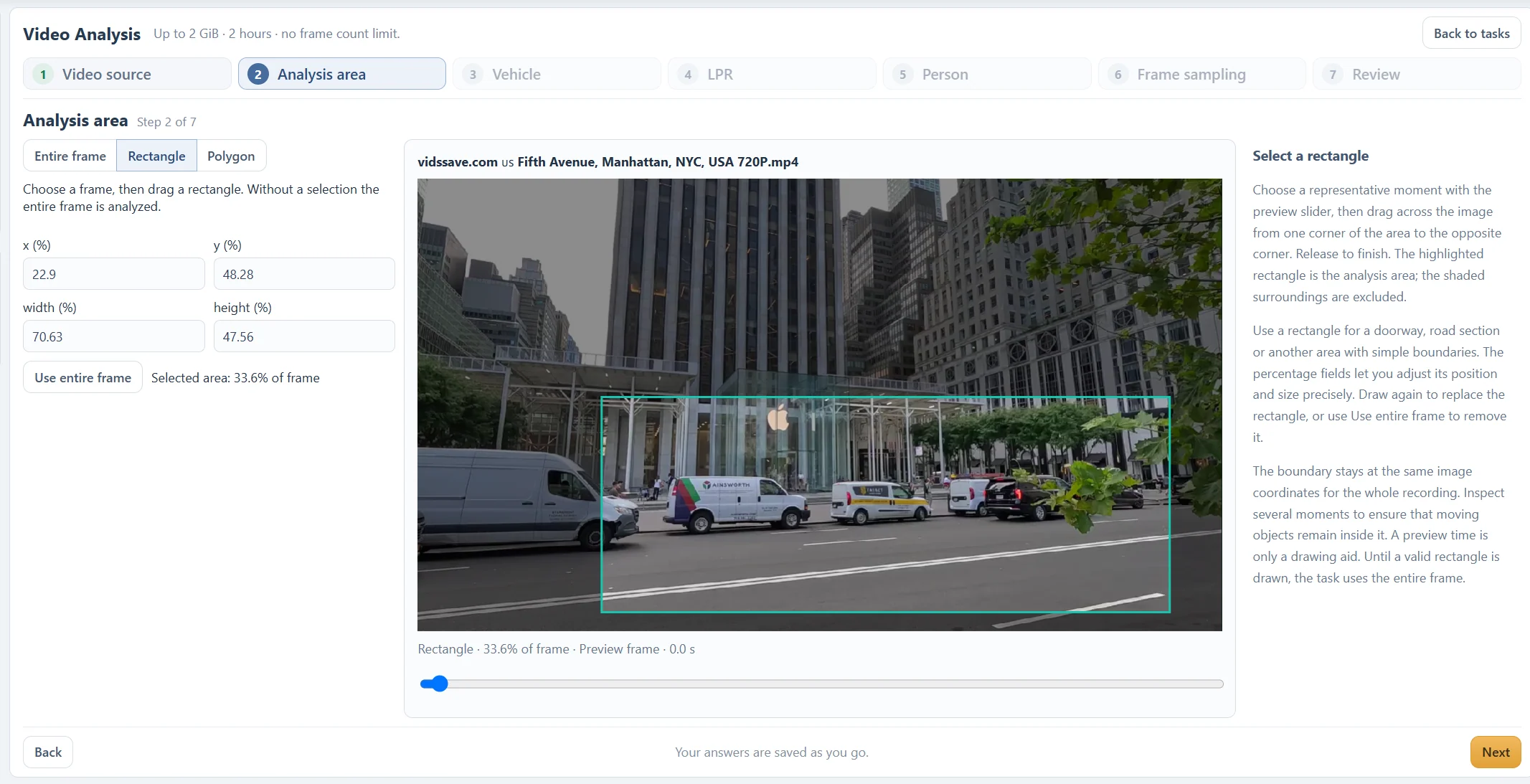
In the street example, the rectangle covers 33.6% of the frame. Its shaded surroundings are excluded. This saves attention for the road, but a pedestrian outside the boundary will not be part of that selected analysis.
An analysis area is not a moving object selection. It does not attach itself to the van, follow a person or track the road when the camera pans.
Draw, finish and check the selection.
Choose a representative preview moment, then drag between opposite corners for a rectangle. The x, y, width and height fields use percentages and let you adjust a rectangular selection precisely.
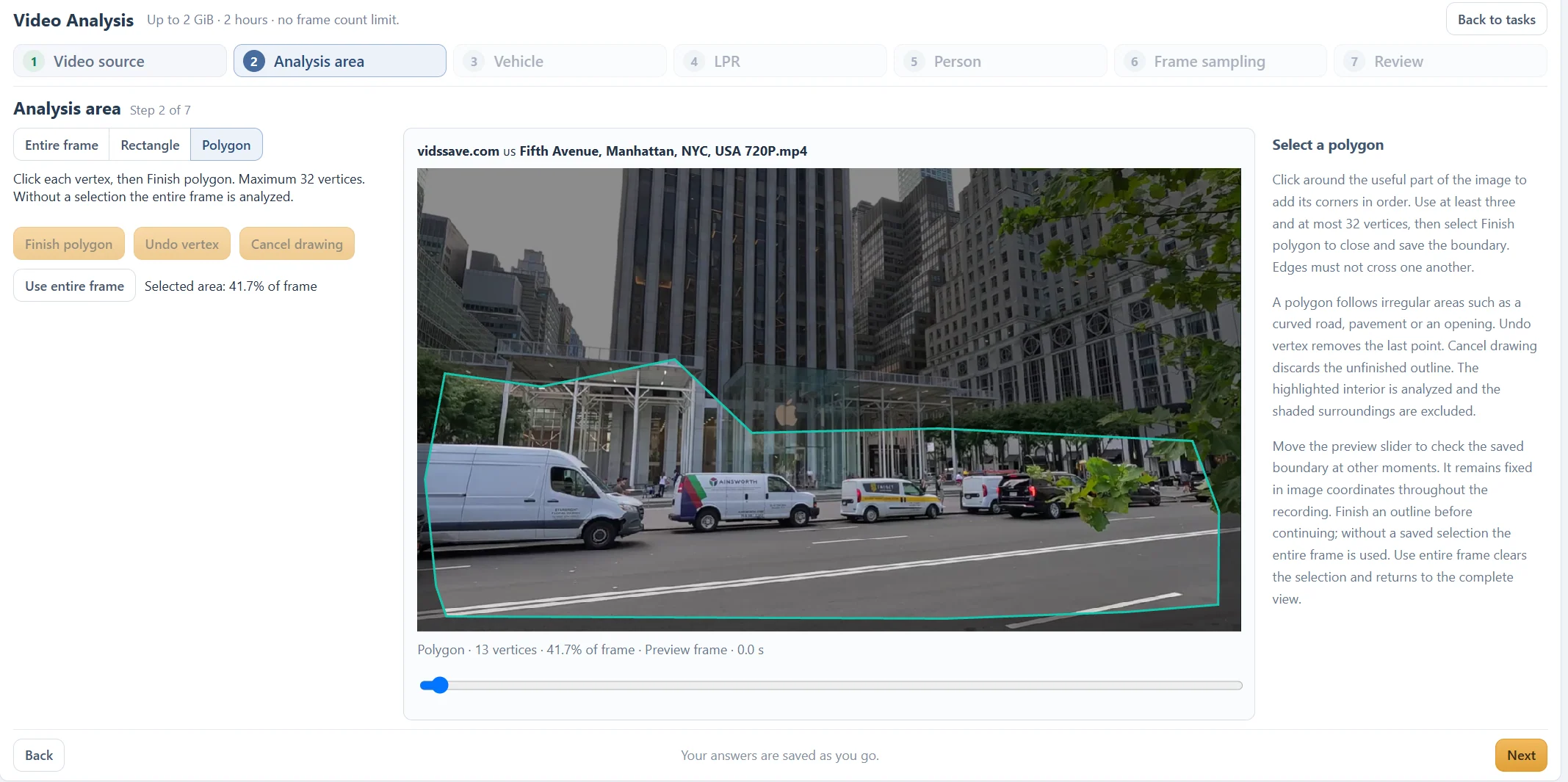
For a polygon, click vertices in order and select Finish polygon. Use at least three and at most 32 vertices, with no crossing edges. Undo vertex removes the last point; Cancel drawing discards an unfinished outline. Without a valid saved selection, the task uses the entire frame.
Use entire frame clears the area. The displayed coverage percentage describes the selected image area; it is not a confidence score or an estimate of processing time.
Check the boundary at several moments.
Move the preview slider to an arrival, crossing and departure. Make sure the useful portion of each object remains inside the same boundary. The preview time helps you draw and check; it does not limit analysis to that single frame.
A moving camera changes the scene behind a fixed boundary. If the useful area drifts, use the entire frame or analyze a shorter, steadier range. Do not assume a boundary drawn at the start follows the camera.
Review the saved area before Start analysis. If results are missing along an edge, rerun a short range with a wider area and compare before changing detection thresholds.
Questions about this workflow
Does the area follow the object?
No. It stays at the same image coordinates. Tracking groups detected observations; it does not move the selected analysis boundary.
Does a preview time choose the analyzed interval?
No. Choose start and end times in the source step to restrict duration. The area preview time is a drawing and inspection aid.
Continue with the next useful step
Choose a Video Frame Sampling Interval
Balance coverage and processing with source-frame intervals and optional adaptive sampling. See why short events need closer sampling.
Troubleshoot Video Analysis: Uploads, Missing Results and Tracks
Work through source errors, empty reports, missing plates, fragmented tracks and processing delays with focused checks before rerunning a video.