
Fix “No Face Detected”
Troubleshoot face detection in CS Match: check framing, rotation, lighting and multiple faces before changing search settings.
Updated · Cyber Search MatchNo face detected means the input could not provide a usable face for comparison. Fix the photo first: choose a clear, upright image with one visible human face and a little space around the head.
Detection happens before matching
The detector must locate a face before the search can compare its embedding with the index. An unsuccessful detection is different from a completed search with no matches. Min similarity controls the latter stage and will not rescue an undetected face.
The current flow also rejects photos with multiple detected faces. If the message says more than one face was found, crop to one person and upload again. Do not assume that the largest face will be selected automatically.
Work through these fixes in order
Keep a copy of the original photo and change one thing at a time. This makes it easier to see whether framing or the source image caused the problem.
| What you see | What to try |
|---|---|
| A tiny face in a wide scene | Crop around one person at the original resolution, with room around the head. |
| A crop cut through the eyes, forehead or chin | Return to the larger original and keep the whole face visible. |
| A sideways or upside-down image | Rotate and save the image upright, then upload again. |
| A dark, blurred or obstructed face | Use another photograph with visible facial features and even lighting. |
| Several faces detected | Crop out every other face and retry. |
| An upload or network error | Retry the upload and check the connection; this is separate from face detection. |
Confirm the retry reaches the search
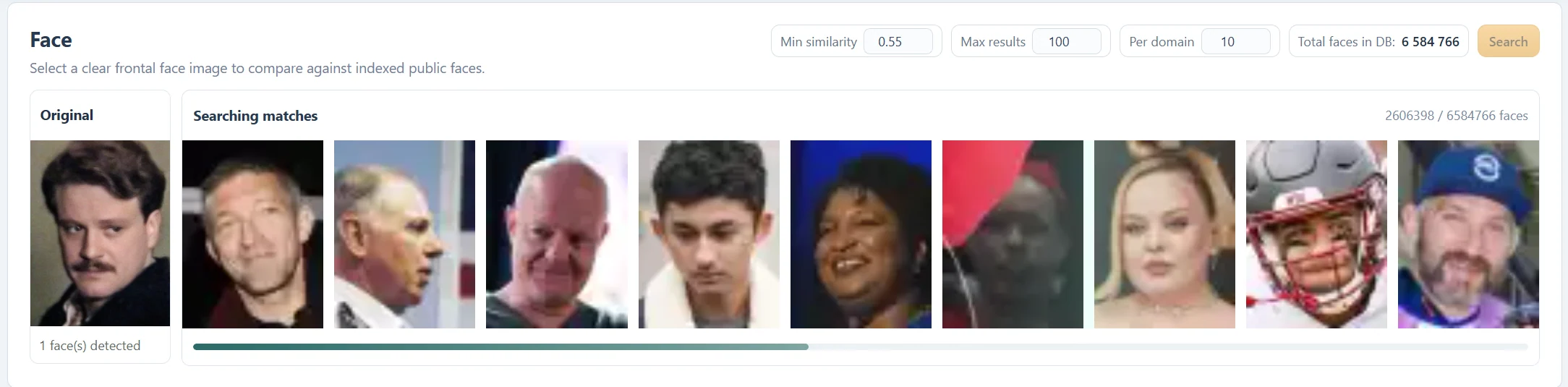
After a successful upload, the Original card should report one face detected. A search progress strip then shows that matching is under way. The passing pictures in that strip are illustrative candidates, not final results.
If detection now succeeds but the gallery is empty, switch to the no-results guide. Repeatedly uploading the same unsuitable crop or lowering the threshold is unlikely to solve the original framing problem.
If a clear photo still fails
Try a second natural photograph and check that the file opens normally in your browser. If the problem persists, contact support with the exact error and the steps that triggered it. Do not include account passwords or private share links. Send a personal photo only if it is needed and you are comfortable providing it.
Questions about this workflow
Can lowering Min similarity detect a face?
No. The minimum score is used after detection, during matching.
Can I use a group photo?
Crop it to exactly one human face before using the current search flow.
Continue with the next useful step
Choose the Best Photo for Face Search
Prepare a clear, single-face image for CS Match. Learn how framing, pose, lighting and cropping affect detection and search results.
Why Face Search Finds No Results
Understand empty face-search results in CS Match. Check detection, photo quality, thresholds, result limits and public-index coverage.
Face Similarity Scores Explained
Understand Similarity, Vector similarity and Min similarity in CS Match. Learn why 100% is not proof of identity and why a lower threshold may not add results.